Remote PHP via vagrant: Cannot parse configuration file

I'm trying to set up remote php on my vagrant box and running into a few issues. I'm running CentOS Linux release 7.3.1611 (Core) with PHP 5.6.5 from the SCL repository.
1) When I try to ssh via Tools > Start SSH Session and I select my vagrantfile, nothing at all happens. Is there some way I can see why it's silently failing? If I select Edit Credentials... instead and specify the user/pass, it works.
2) When I try to set up remote PHP, I have to specify SSH Credentials, because the Vagrant option doesn't work (I'm assuming this is related to #1, above). For PHP executable, I'm using /opt/rh/rh-php56/root/usr/bin/php, which is the correct path, but I'm getting the following:
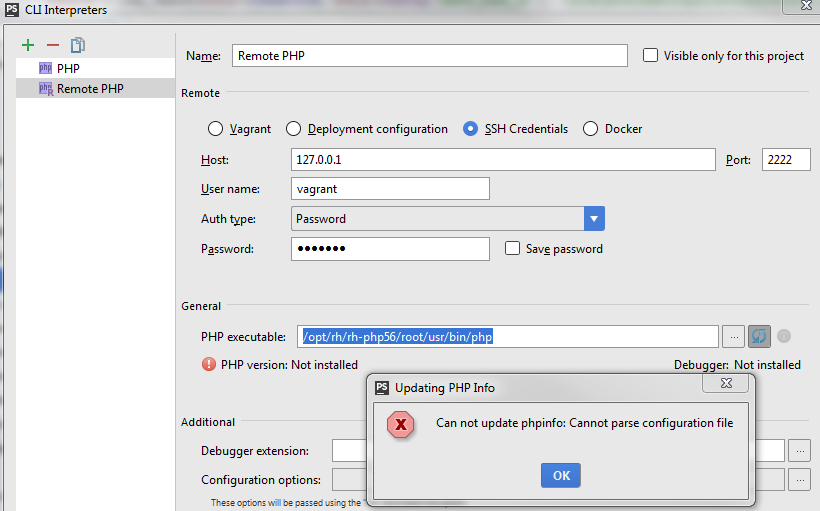
PHP works fine on the vagrant host. I can run php -i and get valid phpinfo output, including xdebug extensions, etc.
Any clues for troubleshooting this?
Please sign in to leave a comment.
Hi there,
Try checking idea.log (Help | Show Log in XXX) for possible details/hints.
You may also enable extra logging and see if it will give more info: https://intellij-support.jetbrains.com/hc/en-us/articles/207241115-How-to-Collecting-PhpStorm-WebStorm-debug-Logs
BTW -- what's your PhpStorm version?
If not latest stable 2016.3.2 -- try it. If you are using latest stable already -- try 2017.1 EAP build. The idea is -- newer version may have this resolved (in case if it's a bug in IDE) or has extra logic that can help diagnose the issue.
P.S.
Similar kind of issue with no follow up: https://youtrack.jetbrains.com/issue/WI-33670