Gradle Spring Boot Project Cannot Run From IDEA

Gradle Spring Boot Project cannot run from IDEA,
Exception in thread "main" java.lang.NoClassDefFoundError: org/springframework/boot/SpringApplication
at com.example.DemoApplication.main(DemoApplication.java:10)
at sun.reflect.NativeMethodAccessorImpl.invoke0(Native Method)
at sun.reflect.NativeMethodAccessorImpl.invoke(NativeMethodAccessorImpl.java:62)
at sun.reflect.DelegatingMethodAccessorImpl.invoke(DelegatingMethodAccessorImpl.java:43)
at java.lang.reflect.Method.invoke(Method.java:498)
at com.intellij.rt.execution.application.AppMain.main(AppMain.java:147)
Caused by: java.lang.ClassNotFoundException: org.springframework.boot.SpringApplication
at java.net.URLClassLoader.findClass(URLClassLoader.java:381)
at java.lang.ClassLoader.loadClass(ClassLoader.java:424)
at sun.misc.Launcher$AppClassLoader.loadClass(Launcher.java:331)
at java.lang.ClassLoader.loadClass(ClassLoader.java:357)
... 6 more
But in eclipse, or terminal it's ok, if use maven as build tools it's also can be run from IDEA,
The step:
1. create a spring boot project use Spring Initializr by IDEA
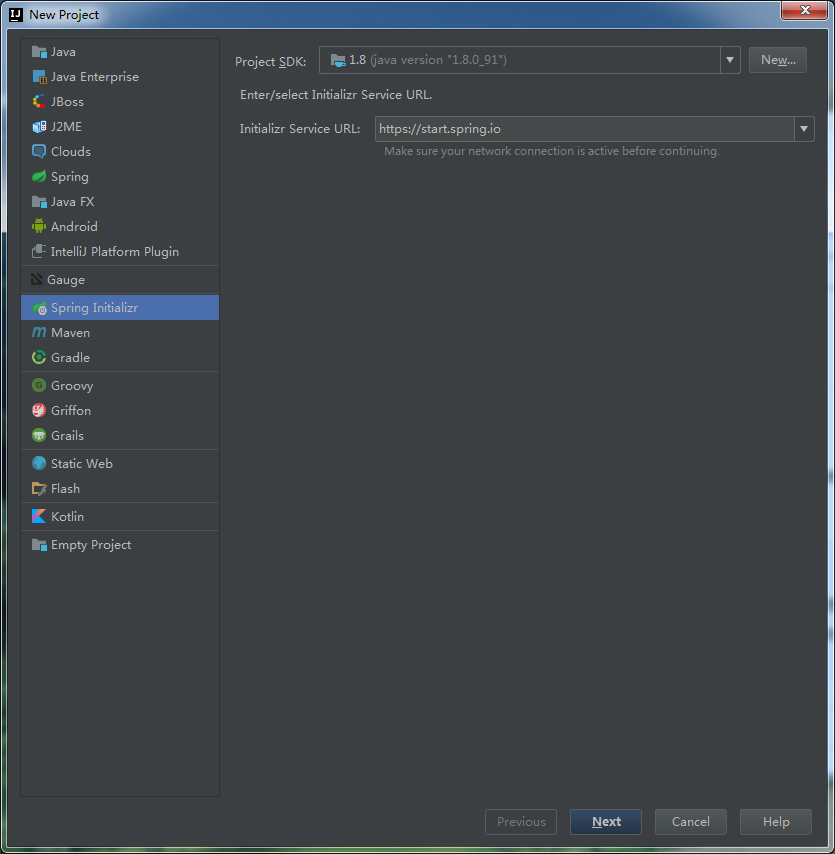
2. choose build tools is gradle


Please sign in to leave a comment.
Gradle 3.4+ causes the problem, see http://stackoverflow.com/a/42588061/104891 for the workaround.
Hmm. I hope the fix will be ported back to 2016.x !
With Gradle 3.3 the same problem.
@uncle zeppelin: it works for me. I have tried the following:
1. Run gradle cleanIdea, followed by gradle idea (if you are using idea plugin)
2. Open build.gradle directly in Intellij.
Both approaches works for me for gradle 3.3. The dependencies are marked as compile dependency. If you are using approach no. 2, make sure that your gradle wrapper is v. 3.3 (that is, of course, if you are using gradle wrapper)
The fix will be also available in 2016.3.6 version.
It's worked for me with Gradle 3.3
I'm also getting this error in 2017.2. Alex's fix worked.