Module source incorrectly identified

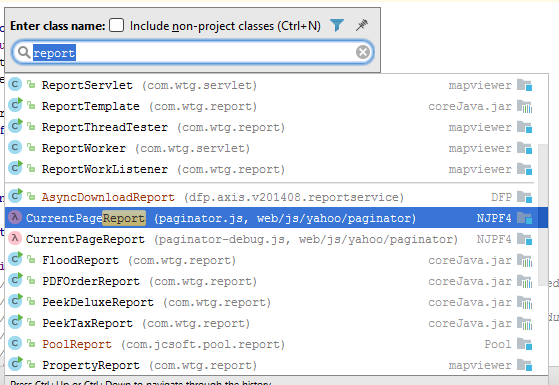
I'm not sure what happened. I have a multi-module project. The Java classes for one of the modules seems to have been disconnected from the modules Java source code and now appears associated with a .jar file - coreJava.jar (the jar happens to contain some of the same classes found in the problem module but is not referenced as a module dependency or anything). When I debug Intellij opens decoded classes from the .jar file instead of the source from the module. When I navigate to classes I see the class file names appear but they are associated with the jar. The sources in the web directory are still associated with the module (i.e. when I do Navigate>Files I pull up files that are associated with the module name. None of the other modules in the project are having this issue. The module source seems to be set up correctly on the module configuration page (see attached) .
Please help. Thanks.
IntelliJ IDEA 2016.3.5
Build #IU-163.13906.18, built on March 6, 2017
Licensed to jack crawford
You have a perpetual fallback license for this version
Subscription is active until May 31, 2018
JRE: 1.8.0_112-release-408-b6 x86
JVM: OpenJDK Server VM by JetBrains s.r.o

Please sign in to leave a comment.
> the jar happens to contain some of the same classes found in the problem module but is not referenced as a module dependency or anything
How does IDE find it then?
Please share the project configuration (.iml files, .idea directory).
That's what I'd like to know.
Zip file here contains .idea directory and .NJPF4.iml.
http://vmdev2.wtgroupllc.com/static/.idea.rar
Thanks
Please share all the .iml files.
All .iml files here:
http://vmdev2.wtgroupllc.com/static/allIML.rar
Files in the /Other sub-directory are modules no longer associated with the project bu that are contained in the project sub-directory.
coreJava.jar is added as a dependency to multiple modules, for example OrderService2.iml:
That is true and expected and has been for forever. However that does not explain why when I try to Navigate>Classes Intellij mis-identifies the module containing classes whose source is in the NJPF4 module as being in corejava.jar. Nor does it explain why debugger decodes classes from corejava.jar when running Tomcat server that does not have any artifacts except the NJPF4 artifact which contains on NJPF module classes and web resources. I think the latter is caused by whatever is causing the former.
Thanks Serge. It would be great if an answer could be posted here for future/others but for now I've created a new module to contain the NJPF4 code and all seems ok.
What about DBTest.iml? Are you sure it's no longer in the project?
This configuration seems to cause the problem:
You should never add module sources to a library.
This fix may have helped a little: https://youtrack.jetbrains.com/issue/IDEA-164317, please try 2017.1