Can't disable font ligatures
Answered

Hi,
I'm using Hasklig font on IDEA Comunity 2017.1 with font ligatures enable. Everything work great!
Now I swith back to Source Code Pro font & uncheck option 'Enable font ligatures', but IDEA still display ligatures symbol like these https://raw.githubusercontent.com/i-tu/Hasklig/master/hasklig_example.png
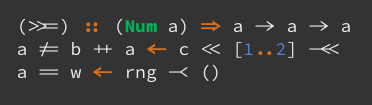
How can I disable this?
Thanks,
-Quan
Please sign in to leave a comment.
Please attach a screenshot with your font settings and a screenshot of the editor where you still see the ligatures.
Here are Font setting & editor with that

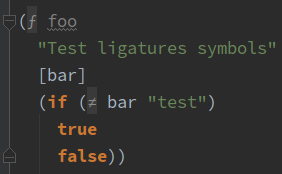
Thanks for the report, I've submitted it to the issue tracker. Please star/vote the issue to receive notifications: https://youtrack.jetbrains.com/issue/IDEA-170551. See https://intellij-support.jetbrains.com/hc/articles/207241135 if you are not familiar with YouTrack.
Please attach your IDE settings (File | Export Settings) and idea.log (https://intellij-support.jetbrains.com/hc/articles/207241085) to the issue linked above.
Do you use Advanced Java Folding plug-in? Does it help if you disable it?
oops, it's cause by https://github.com/zjhmale/intellij-clojure-pretty-symbol. I forgot I have it installed :)
For anyone else finding this. This can also be a case of configuring ligatures in the incorrect place. I had ligatures turned off in 'General | Font', but it's also configured in 'General | Color Scheme | Console Font'. I needed to disable in both places before I seen 'real' characters again.
Thanks, Graham Kelly! Also I found this configured in "Editor -> Reader mode -> Font ligatures", it should be switched off too.
Further it must be disabled in General | Color Scheme | Color Scheme Font.