Bad font rendering in editor in IDEA 2017 vs. IDEA 2016

I've checked every available stackoverflow, gist, and information on this issue and tried everything.
Font rendering in the editor in IDEA 2017 (v 171) is incorrect.
I have both IDEA 2016 (v. 163) and IDEA 2017 (v. 171) installed. Everything works and renders properly in IDEA 2016. Interestingly, I first installed IDEA 2017 without the bundled JDK and the font rendering issue showed application-wide (menus, sidebar, etc). After installing the version with the bundled jdk, the application font rendering was fixed but the editor font rendering is still off.
The vmoptions are the same for each installation.
vmoptions for 2016 (left) and 2017 (right)

Editor font rendering in 2016

editor font rendering in 2017

editor font settings in 2016
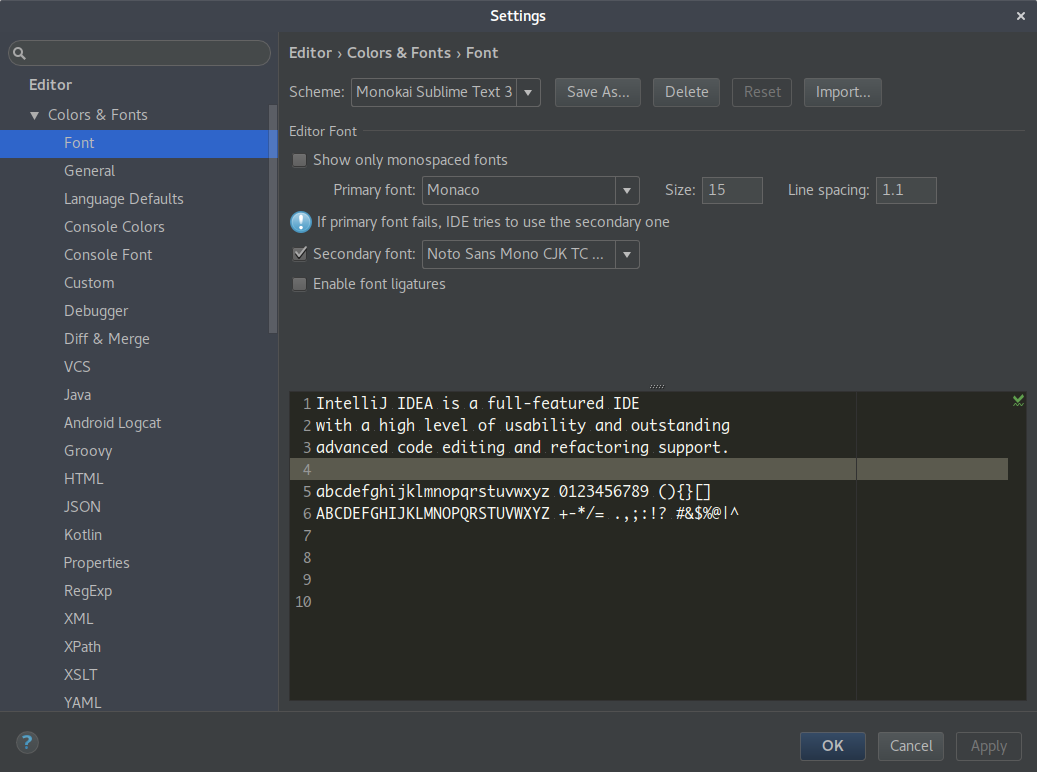
editor font settings in 2017

closer view of the font differences

Please sign in to leave a comment.
See https://gist.github.com/CrazyCoder/0d9e54f450000d3fb6edcbda6d9788be.
Serge,
Thank you but I already tried the setting in that gist before posting this. It didn't help the problem.
Please show your .vmoptions file contents and About dialog screenshot.
You are running on JetBrains Runtime build 736, gist suggests to install build 783 and switch to it. Of course it doesn't work for you, you didn't follow the instructions carefully. JVM option has no effect with your runtime version.
Serge,
My mistake. I followed the instructions in your gist and it fixed the problem.
Thank you for the fix, It's been driving me nuts for quite some time now!