How to choose main class
Answered

I have a rather odd question that makes me look like a newbie (which I kind of am).
When running a file, I have to specify the main class.
This is my code:
import java.swing.*;

public class Sokoban {

    public static void main(String[] args) {
        final char[100, 100] Board = new char[100, 100];
        final char[100, 100] Position = new char[100, 100];
    }

}

But when trying to run this file (as a Java applet), I can select the main method in the form that appears, but the OK button is grayed out. So I cannot run the program.

Anyone got a solution?
And a related question, every time I try to run a program I have to fill out this form. Is there a way to circumecent this?
Thanks!
Please sign in to leave a comment.
See https://www.jetbrains.com/help/idea/2017.1/running-applications.html.
Your code is not an applet and cannot run as such.
Thanks! But I'd like my app to be an application, not an applet, How do I select a main method then?
I can select the "main" method in the toolbar above, according to the document you referenced (?)
But then in the document you referenced, it said: "
Do one of the following:
Unfortunately, if I set my app to be an application, the menu above looks different from above; I just get "Edit configurations" again and nothing else and . How can I compile my app as an application?
Create Run/Debug configuration first, this can be done using the context menu or Ctrl+Shift+F10.
(My reaction above was to IntelliJ)
Serge, my menu (assuming it's the left one) looks quite different from yours. (But also the other menus - not the left one - look differerent.) Here's my left menu:
What have I done wrong?
Right click inside the editor with the Main method. Create a configuration, then choose it here:
See the video:
Thanks guys!
I am new to Java. Poking around and doing some simple exercises. I am able to create a project and compile/run it the first time. When I exit it and reload it later, it refuses to run.I tried saving the configuration before existing the project. But, when I come back in, I can't find the configuration I set up. I then try to create a new configuration: it says Class-is-not-found (see screen shot below). Can't find Main when I click on the ellipsis and search for the Main class or click on the Project Tab ... I do see the Main.java file and double click it ... it won't select it. Not sure what I am doing wrong.
Please see https://stackoverflow.com/a/43319356/104891 and https://stackoverflow.com/a/42660624/104891.
Thank you Serge for the stack overflow links. I went through them... Still not luck. I created a very simple "Hello-World" program. See screen shots below. I'm running everything in my localhost.
You must mark src directory as the Source Root as described in https://stackoverflow.com/a/43319356/104891.
Serge: Really appreciate the help. I followed your instruction from Stackoverflow and added the src. It now finds the Main class! That's awesome. But, I still get an error ... Aargh... Feel so close! I provided screen shots of the configuration and the runtime console at the bottom for you to review.
Try to move the project outside of the OneDrive directory. Make sure the class builds and you can see the .class file under the output directory. Build | Build should complete without errors.
Serge, Thanks for staying with me on this. This is finally what worked for me! Phew!
My Problem: Whenever I exit Intellij and try to open up an old project, I have trouble getting the builds and execute to work.
Here are the steps that finally worked on my localhost environment:
1. Go to Project Structure and Select Project
a. Set the SDK to 10 (“Java Version 10.0.2”) or whatever you are using.
b. (I think this was what was the main step missing) Set the project compiler output to point to where I want the compiled output to sit: C:\Users\kbala\OneDrive - MatrixCare\SoftWLearnings\Javamyfun\NewHelloWorld\out
c. Project Language Level: I chose “SDK Default”
2. Go to Project Structure and Select Modules
a. Click on src (this is where my source code sits).
b. Then, Click on the “Sources” folder icon on the top. This adds src to the “Source folders” on the right. You will see the color change to Blue
c. Click ok.
3. Then, click on “Add Configuration” (top right corner of Intellij)
a. Select + at the top left hand corner.
b. Select “Application”
c. Change the name to “Main”
d. Now click on the Ellipsis (three dots) in “Main Class”. You should now see your Main Class. Select it.
e. You should now see the execute arrow at that top right of Intellij. And you should see the build icon (Hammer).
This should work!
Your problem seems to be caused by OneDrive not saving all the files correctly.
Thanks Serge. I think it does save it correctly, but, I did not have the right references in the configuration. Your suggestion on adding the src to source (link to stackoverflow) and the setting where I want the compiled output to sit was the key.
Thanks again! This helped a lot.
Мне нужна вся эта возможность, чтобы создать проект и все прекрасно заработать, как в той же андроид-студии. Все, что нужно, - это одно и то же рутинное действие. Чтобы исправить это, поддержка отправляет читать стаковерфлоу. Ну и конечно же круто когда пытаешься создать конфигурацию, файл с мейн функцией просто не воспринимается
Пришлите скриншот с окном IDE, где виден файл с main методом, для которого не создается конфигурация запуска.
К сожалению, не видно содержимого файла Main.kt.
В языке Kotlin нет метода main внутри класса, как в Java: https://kotlinlang.org/docs/tutorials/getting-started.html .
Убедитесь, что функция main находится прямо в файле Main.kt:
I am having the same problem with setting up Scala project.


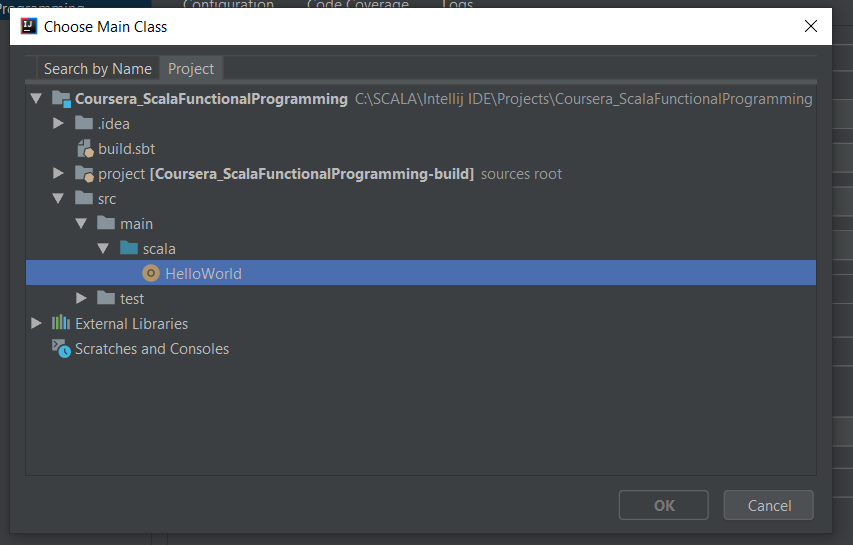
It is a simple HelloWorld app - here is my Intellij IDE project view screenshot :
Then I selected Run->EditConfigurations :
and tried to choose HelloWorldas the main class. Dialog wouldn't allow me to because OK button is greyed out :
Any suggestions, Sergei ?
Thank you.
I can't reproduce the problem:
Please zip and upload the sample project at https://uploads.services.jetbrains.com/. Specify the file name.
What IntelliJ IDEA and Scala plug-in versions do you use?
I uploaded my project to jetbrains, zip file name is BorisAshmanSolutions.zip
My current settings :
IntelliJ IDEA 2019.1.3 (Community Edition)
Build #IC-191.7479.19, built on May 28, 2019
JRE: 1.8.0_202-release-1483-b58 amd64
JVM: OpenJDK 64-Bit Server VM by JetBrains s.r.o
Windows 10 10.0
SCALA Plugin v 2019.1.9, vendor : JetBrains
Another problem which I ma having are duplicate lines in SBT configuration file .idea\libraries\sbt__org_scala_lang_scala_library_2_13_0_jar : each of the line below is duplicated, which causes a complie error :
<root url="file://$USER_HOME$/AppData/Local/Coursier/cache/v1/https/repo1.maven.org/maven2/org/scala-lang/scala-compiler/2.13.0/scala-compiler-2.13.0.jar" />
<root url="file://$USER_HOME$/AppData/Local/Coursier/cache/v1/https/repo1.maven.org/maven2/org/scala-lang/scala-library/2.13.0/scala-library-2.13.0.jar" />
The only solution I found so far is to manually edit this file and remove duplicate lines (in my project zip, these dulicate lines are removed). Is there more effective way to solve this problem with SBT ?
Thank you !
Try the latest IntelliJ IDEA/Scala plug-in versions.
I reinstalled Intellij (and plugins) about a month ago.
What are the latest versions ?
Could you provide links, if possible ?
Ok, I upgraded to latest version - IntelliJ IDEA 2019.3.1 (Community Edition), Build #IC-193.5662.53, built on December 18, 2019 - and it looks like it fixed both problems. Thank you !
Hello Serge,
This is my code
when I run it, it doesn't show anything.
it just showed
"C:\Users\Anand Kumar\.jdks\openjdk-15.0.1\bin\java.exe"
Process finished with exit code 0
Please help me.
Thank you.
@... IDE works correctly here. Your program does not produce any output.
Try creating a swing application using a tutorial, for example this one: https://www.youtube.com/watch?v=5vSyylPPEko
Thanks for help @Konstantin Annikov.
hi one more problem
this is my code
the error it's showing is
thank you.