Issue while trying to import multiple gradle modules

Hello,
We have several gradle projects with the same structure. configuration, service tests as main folders and in tests we have component, integration and performance.
We want to import them in 1 big IntelliJ project to make search and replace and the overview of the used packages easier. The integration with git works marvellous, the different repository roots are all recognised and if we need to push things from different repositories it all works easy with just one commit message to type instead of several. The update of these repos works great as well.
The problem is the recognition of the gradle plugin. It seems that the submodules under the tests folder are interpreted in several ways although the structure of each project is the same. so far we found 3different behaviours. I removed the project names of the screenshot as it is confidential. but please read the red markings as "my-project"
1. The modules are integrated as normal modules called component and integration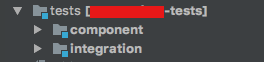
2. The modules are recognised and with the prefix of the module above

3. The submodules are not recognised as such
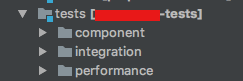
the behaviour that we would wish for is that the submodules are recognised and prefixed with the supermodule and the project name.
EXAMPLE:
my-project
|--- service
|--- tests
|--- component
|--- integration
would end up with modules:
* my-project-service
* my-project-tests
* my-project-tests-component
* my-project-tests-integration
we tried to change the names manually and add the missing modules, but that didn't work and as soon as we refreshed the gradle configuration everything was gone agian.
Is there a way to acchieve these structure?
Please sign in to leave a comment.
What IntelliJ version do you use?
We are using intelliJ 2016.3 but for the multi-project trial we also downloaded the latest version 2017.1
with 2016.3 it didn't work out at all, but with 2017.1 it worked much better, although there are still the issues described above
I see, there is still an issue with module names deduplication. However you can try incubating feature of 2017.1.
Steps to setup:
The property is set in registry, e.g. open Registry (Control + Shift + A for Registry), check project.qualified.module.names option, close registry and restart.
Note: it's important to use IntelliJ project without other modules
(File => New => Module from Existing sources... => Import Module => Gradle)
Does it help?
I tried the steps after enabling the property but I think the behaviour is even worse now. More like the behaviour of 2016.3
Is there a fix planned for this? It is a very very handy function for us but not really usable at the moment.
As I wrote in my post the chaining of the names in the modules would be best as you can group them easier and if you sort by name every modules that belong together are listed together
Hm, the project.qualified.module.names option should normally work for projects like you described.
Could you share the sample to reproduce issues with this option enabled?
I tried to remove all personalized things in our project, but it is too much effort. basically it has weird behaviour when having duplicate names for the submodules in a project.
hello, any update on this? You said "I see, there is still an issue with module names deduplication."
Will that be fixed in the next update? Is there any ticket I can monitor?
I would like to fix related issues using the project.qualified.module.names. I created the sample project based on your description and it works fine.
If that option doesn't work for you, please share the project sample to reproduce it, see my answer at https://youtrack.jetbrains.com/issue/IDEA-159811#comment=27-2121817
Thanks, I will try to make a sa,ple project on the weekend. Could you maybe give me the sample project you made where it works? Then I have something to compare.
Thanks
here is my sample https://drive.google.com/file/d/0B89O0JNtSDHyZ0dPYWpHcV9VWTA
Hi,
we tried to import your sample project and we have the same behaviour with it as with our project (please see picture)
Could it be that there are some preferences set in a wrong way for it to work?
Could you attach dedupTest/.idea/modules.xml file?
the modules.xml can be found here https://drive.google.com/file/d/0B2rQ9dwngWAVbHJFYVo5RnFEZk0/view?usp=sharing
You didn't enable the project.qualified.module.names property. To enable it, please follow steps described at https://intellij-support.jetbrains.com/hc/en-us/community/posts/115000171584/comments/115000212964
Hello, I did enable the property as shown below:
The modules.xml looks like it was created with disabled option.
could you try the following: download my sample once again and open it as an IntelliJ project, ensure the option is enabled and refresh projects using Gradle tool window. Does it help?
I tried this approach, but it didn't help. I unzipped the project and initialized a git repo in there. then I opened it with intelliJ and committed the changes after that opening. then I clicked refresh and committed everything again, so you can see how the files change during the process.
You can find the project including the git data here: https://drive.google.com/open?id=0B2rQ9dwngWAVLUlNRXJvaW5Tek0
Edit: I completely removed IntelliJ and all the folder described here: https://www.jetbrains.com/help/idea/2017.1/directories-used-by-intellij-idea-to-store-settings-caches-plugins-and-logs.html
After installing intelliJ2017.1.2 again and setting the property I reimported the project. But there is no change.
Sorry for the inconvenience the feature is in incubation stage. May I ask you to try the IDEA 2017.2 EAP? It should be available soon.
Did my project with the change log help recreating the problem?
Do you have a date when 2017.2 EAP will be released?
2017.2 EAP is available at https://www.jetbrains.com/idea/nextversion/.
Hi, in 2017.2 EAP the issue seems to be resolved. On the other hand this version is unusable as it gets stuck after importing 3 modules. When will this version be released?
> This page lists pre-release builds of IntelliJ IDEA 2017.2, the update we're releasing in Summer of 2017.