Input box padding/clipping error on IDEA 2017.x

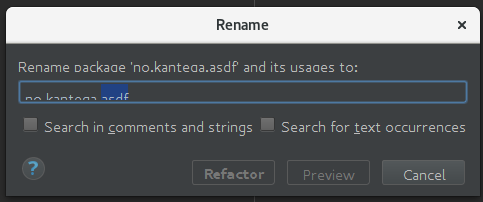
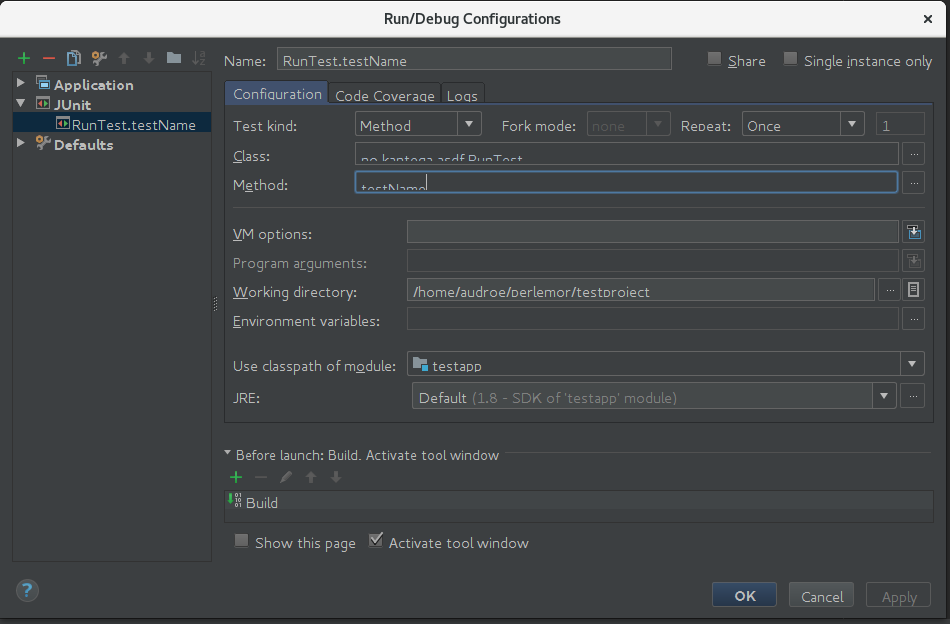
Ever since upgrading to IDEA 2017, I've had padding/clipping issues in some types of input boxes (see screenshots). In some it's so bad that 30-50% of the line gets sawed off, in others it's just a few pixels missing at the bottom, which still sometimes makes it hard to distinguish i from j... It's annoying enough that I've stayed on 2016.3 for now. 2017.2 did not solve this issue for me.
I'm running IDEA on Fedora 25. However, a colleague that also runs F25 does not have the issue. I tried removing my ~/.IntelliJIdea2017.1/ folder to see if it was an old settings issue, but that sadly did not fix anything. Also tried messing around with different fonts/sizes without much luck. Maybe I just haven't found the correct font setting.
Any suggestions on what else to try or tweak to resolve this?
Please sign in to leave a comment.
Switch back to JetBrains Runtime: https://intellij-support.jetbrains.com/hc/articles/206544879.
Wow, that was quick. Thanks! Works perfectly with the bundled runtime. (for some reason, I had set IDEA_JDK to Sun/Oracle JDK_HOME in my .bash_profile)