How do I get rid of this godforsaken popup?
Answered

EVERYTIME I start my program, this damn thing pops up and asks me to confirm. 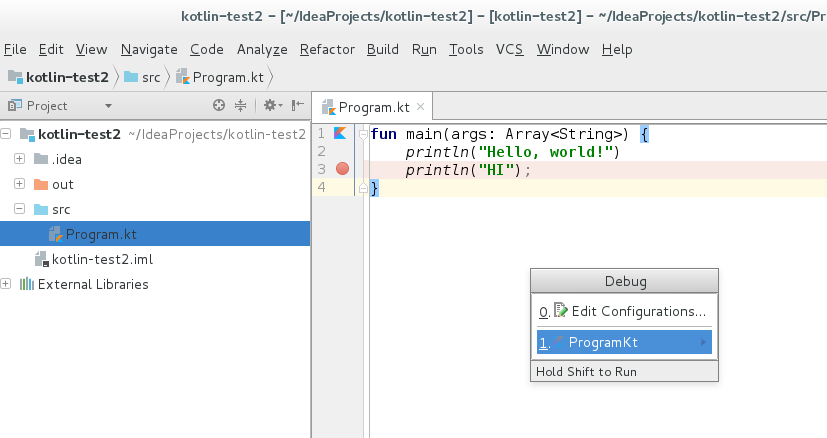
Please sign in to leave a comment.
This popup is triggered by a hotkey, could it be that you have some stuck keys?
Does it help if you remove the keyboard shortcut from this action?
Serge, it doesnt make any sense to begin with. First as an aside: I switched to visual studio keytheme. Ok so I can start the debug with F5 even though the keymap doesnt show f5 as a valid key, it shows ALT+f5 (which wouldnt be correct for visual studio anyway)
Ok so I removed the hotkey for "Debug..." anyway like you said or implied but it still shows the popup.
Here you see it LIVE the problem: http://imgur.com/a/enn8x
as a disclaimer I'm using the preview build for intellij ultimate from the website from 15min ago, but it would be weird if all this basic stuff is broken imo
There are 2 debug action: Debug and Debug...
The latter one displays the popup, the former starts the currently active configuration.
Try assigning a new shortcut to Debug action instead of Debug... and use it.
OK it seems that I have to click DUPLICATE on the keymap and THEN switch the keys. Apparently editing the clearly editable fields does not actually edit the fields even though I click apply and everything because it's not editable in the background as a default keymap. WOOPS, clear usability bug there imo but that's up to you.
After you edit the default keymap which is read-only, the modified keymap is saved automatically with the "copy" added to the keymap name.
yeah I wish it were like that too
It works exactly as I've described in the current release version.
I literally gave you a video PROVING that there is a bug. You're not going to get a better bug report. It shows that I removed the shortcuts. It shows that I still got the popup [somehow], you'll just have to take my word for it that I pressed f5.
Yes the copy did get created, but it was a buggy copy somehow that wasnt actually applied until I created one myself.
My comment was about automatic keymap saving under a different name. The keymap copy created automatically is definitely editable and it's not a bug related to keymap saving/copying.
F5 problem is unrelated to that, it happens because F5 is also mapped to Resume program in this keymap. If there is no active debug configuration, Resume action will try to start one, therefore a popup is displayed. If you remove F5 from Resume and assign F5 to Debug action, the problem will be no more.
Here is the open request related to F5 handling in the Visual Studio keymap: https://youtrack.jetbrains.com/issue/IDEA-172263.