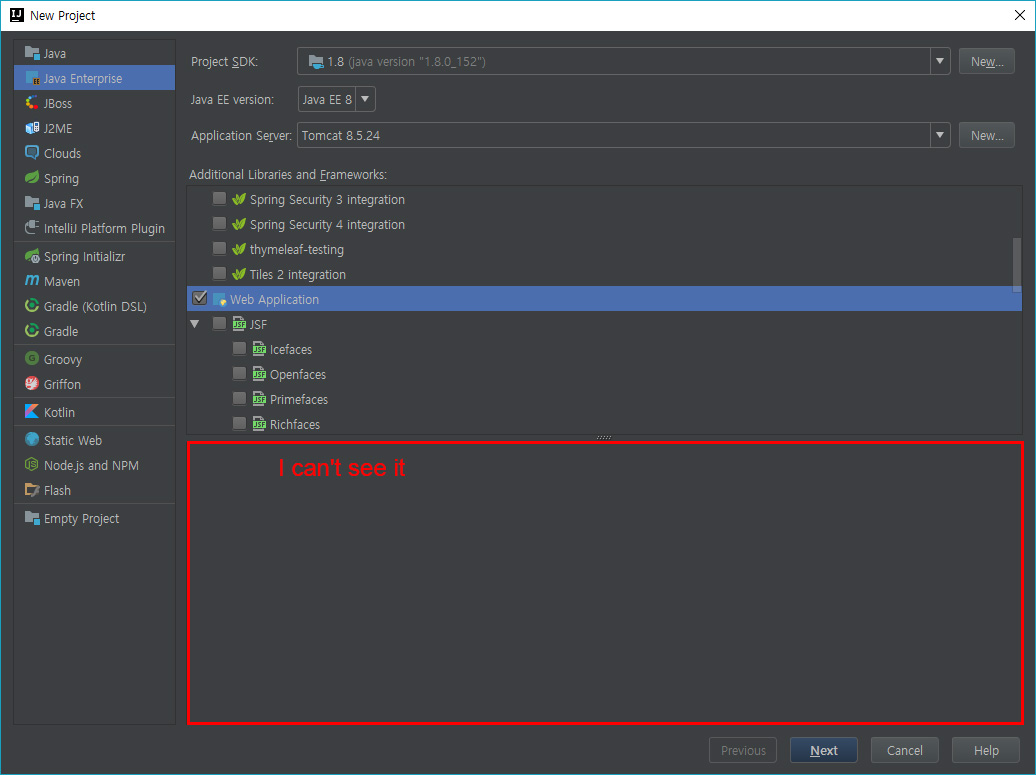
Servlet Spec Version selection option is not visible.
Answered

In the offical documents (https://www.jetbrains.com/help/idea/preparing-to-develop-a-web-service.html)
Enabling Web Services Development Support through a Dedicated Facet
3. "Under Additional Libraries and Frameworks, select the Web Application checkbox.
Select the version of the Servlet specification to be supported from the Versions list.
If you want the deployment descriptor web.xml file to be created, select the Create web.xml checkbox."
previous version see them
It is not visible to the full window.
I created ' web.xml ' in earlier versions, but it is inconvenient.
Using version Info.
intellij idea 2017.3
Java 9 / 8
Tomcat 8.5 / 9.0x beta
Please sign in to leave a comment.
This option is available only for Java EE 7.
Related ticket: https://youtrack.jetbrains.com/v2/issue/IDEA-180265.