(Formatting) Javadoc on same line as function/class?
Answered

I like the cleanliness of the way the javadocs below are formatted
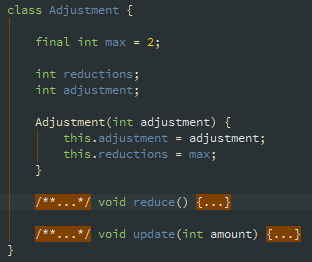
versus the way these javadocs are formatted
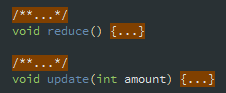
and was wondering if there was a way to set the formatting of IntelliJ so that when I hit ctrl + alt + L it auto-formats javadocs to be placed like they are in the first image, rather than the second image. Essentially I need it to not place whatever the javadoc is attached to on a separate line. I've searched through the settings and it didn't surprise me that there wasn't a setting for this but maybe I missed something or there's a workaround someone knows about.
Please sign in to leave a comment.
Request is welcome at https://youtrack.jetbrains.com/issues/IDEA.
As far as I understand you want it appear this way only in folded mode.