IDEA 2023.3.5 is very slow on my iMac
Answered

Hello I have a iMac 2019 model with macOS Sonoma 14.1 and with the following details:
Processor: 3GHz 6-core intel core i5
graphics: Radeon pro 560x 4GB
RAM: 8GB MHz DD4
I recently installed latest version of IDEA and when I launched the application it takes hell lot of time for the editor to be available for me to use, it is very annoying to use. I don't the issue when I use the editor on my windows machine.
I am using java 11 as my JVM runtime.
Could you please help me what could be going wrong with my iMac ?
Thanks,
Sasi.
Please sign in to leave a comment.
Could you please restart IDE, reproduce the issue again, and share your IDE logs (Help > Collect Logs and Diagnostic Data)?
Logs contain useful information about your environment as well as some errors/exceptions related to the issue you are encountering. You can upload the logs zip file here: https://uploads.jetbrains.com, just share the uploaded file ID. Thanks!
Hello,
Thank you for your quick response. Please find the attached file uploaded id below:
Upload id: 2024_03_19_xYNo4fkTvUHRHyDG2D6W5s (file: idea-logs-20240319-1107017895637985981391302.zip)
It would be really great if you can help me with this issue.
Thanks
Thank you for the logs. Is the issue happening for any project, only for a particular one? Is the IDE responsive - i.e. you can perform certain actions, or is it completely frozen while the project is loading? Could you maybe share a screen recording that shows the behavior while it is performing slowly? Again, you can zip the file and upload to: https://uploads.jetbrains.com, just provide the uploaded file ID.
Yes it is happening for any project. IDE is not responsive as seen in the recording when I tried to click on the files nothing happened. If you see IDEA is the only application I started and it took close 2min40sec to become available for the usage.
here is the id of the recording
Upload id: 2024_03_20_TQC48zRdQ21jWXqsuLK4bJ (file: Screen Recording 2024-03-20 at 14.07.34.mov)
Thanks for the help.
Thank you for the screen recording. It looks like the IDE is loading, but very slowly. It could be freezing occasionally as well, but in general it looks like it is doing something, however, very slowly. Could you please try to record a CPU snapshot during the IDE startup - Help > Diagnostic Tools > Profile Slow Startup > Change and Restart IDE? After the restart, invoke Help > Diagnostic Tools > Stop CPU Usage Profiling. Then upload the snapshot to: https://uploads.jetbrains.com? Snapshot can help to investigate the components which are using most resources during the startup.
Hello
Please find the attached file:
Upload id: 2024_03_24_gWG8TFq3cn77AmN5mMSjLg (file: IU-233.14808.21_sasi_24.03.2024_07.26.45.zip)
But I don't think we can find here something related to the slowness during startup because the cpu snapshot captured here is to find the usage during any activity on the IDE not during start up.
Let me know if you need anythin else.
Thanks,
Thank you for the snapshot.
You're right. Sorry, please install YourKit Profiler for IDE Performance Testing plugin first (in Settings (
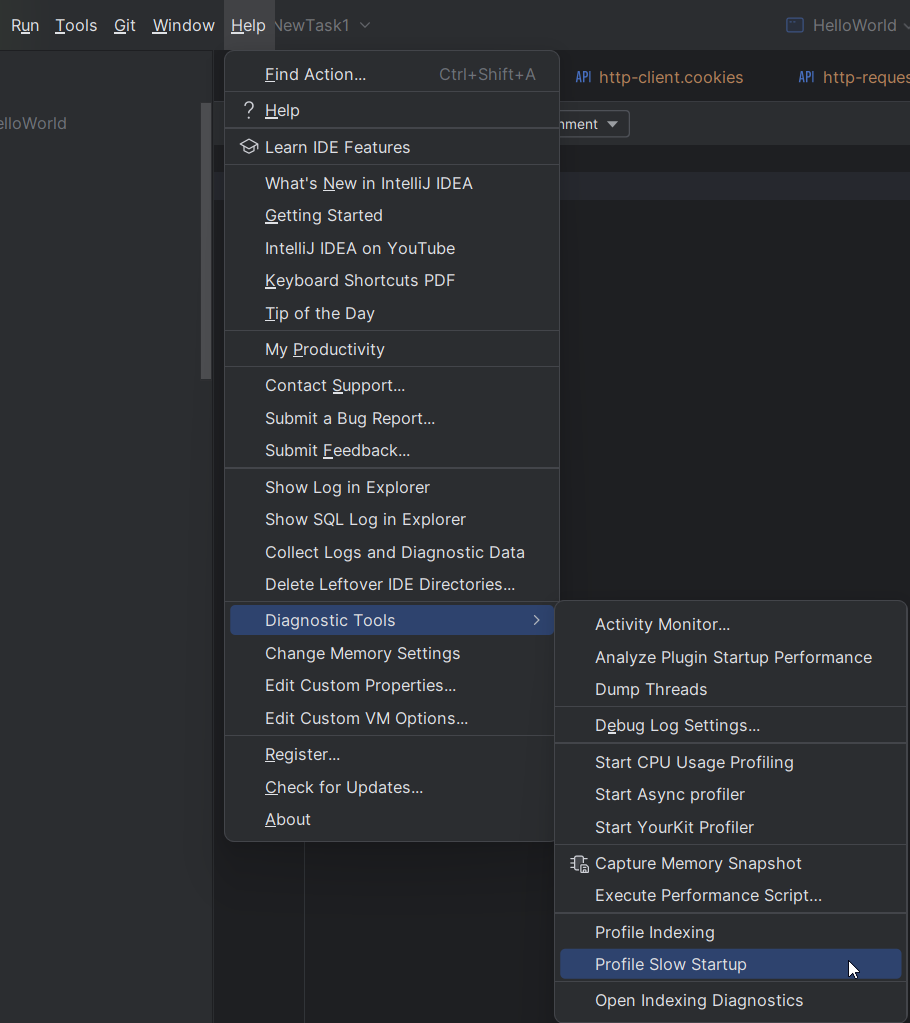
⌘ + ,) > Plugins > Marketplace) and restart the IDE. After that, you will see a new option under Help > Diagnostic Tools > Profile Slow Startup. This option should record a CPU snapshot on the next IDE startup. To get the CPU snapshot just click on Help > Diagnostic Tools > Stop CPU Usage Profiling. Please share this snapshot to check for startup performance issues. Thank you.Hi
here is the file id of the profiling snapshot: Upload id: 2024_03_28_eqnKKipoGG1eZXRKdKcEct (file: IU-233.14808.21_sasi_28.03.2024_12.30.54.zip)
what I observed is the slowness is only during the first start up of the IDE, if I do restart several times later then it is not as slow as during the initial start up. Anyway I took the snapshot during the initial startup
I hope this will help in finding the rootcause for the slowness.
Thanks,
Sasi.
Thank you for the snapshot. I see a lot of indexing and file read activity going on. Could you try to close IDE and delete the IDE system directory. This will force IDE to re-create indexes and caches for the project on the next start. It may take some time initially because of re-indexing, so check it by restarting IDE couple of times.
P.S. Do you have a security software installed, like antivirus or similar? It could be scanning the IDE files in realtime and slowing down the startup too. If yes, please try to add the mentioned paths to the scanning exclusion list: https://intellij-support.jetbrains.com/hc/en-us/articles/360006298560-Antivirus-Impact-on-Build-Speed.
Thank you for the steps.
First of all I don't have any antivirus installed on my machine.
I deleted the several directories which were under Caches/Jetbrains and restarted the IDE. Looks like it was much better now.
I did the profiling one more time just to see if there is anything else causing the issue.
could you please check the snapshot again ?
Here is the uploaded id:
Upload id: 2024_03_28_fkS7gEUbw4nD8M3g1CdRVr (file: IU-233.14808.21_sasi_28.03.2024_15.30.27.zip)
Really appreciate your help.
Thanks,
Sasi.
We have checked your shared logs and snapshots.
The IDE took a lot of time loading some class files for some reason.
This may explain why the IDE starts much faster if you open it several times, as it has some file caches in the system later.
After deleting some files in the Caches folder, do you still have this issue currently?
How long does it take to start the IDE now? Thanks.