PyCharm doesn't recognize ipython

I made a virtualenv environment for Python 3.2 and installed ipython in it. When I run it from the command line it works perfectly. When I use this environment in PyCharm as the project's interpreter, it doesn't recognize ipython. What could be wrong?
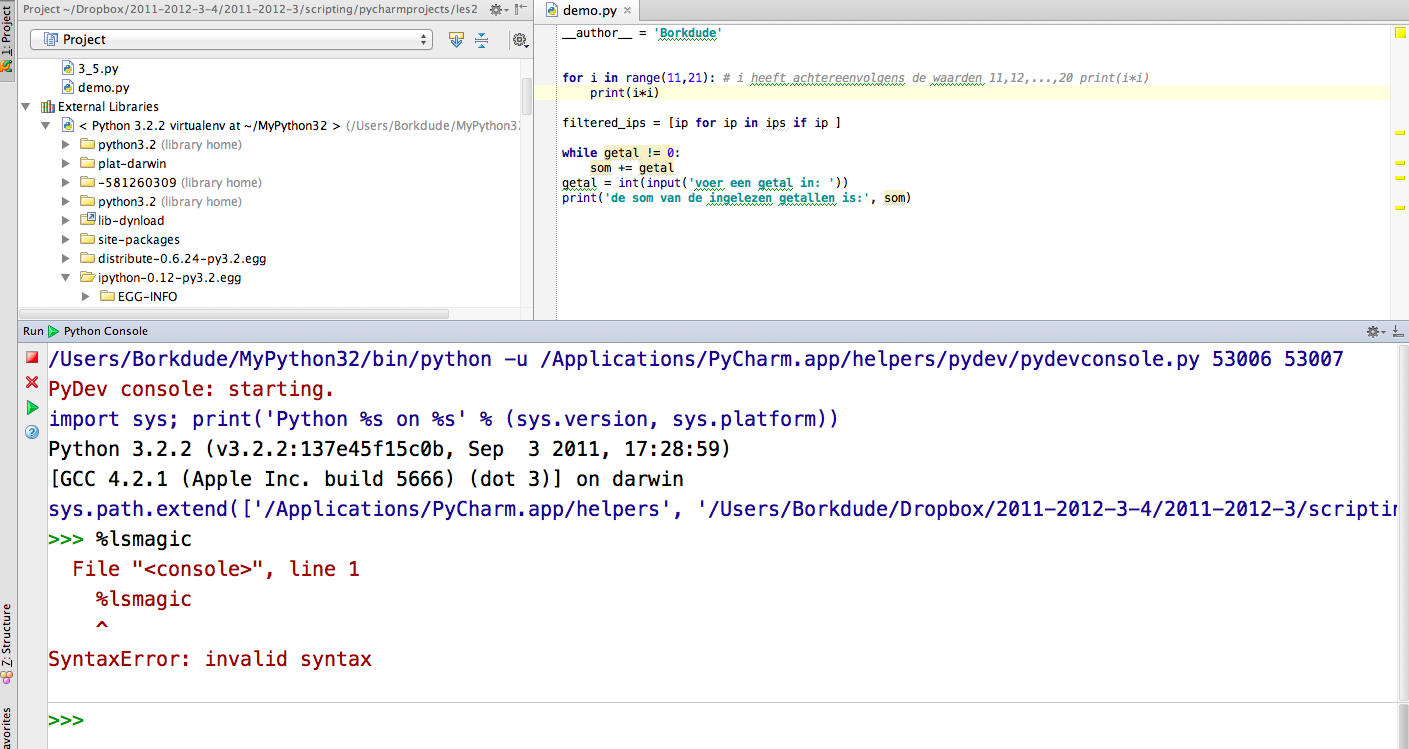
Attachment(s):
Schermafbeelding 2012-02-17 om 22.29.02.png

Schermafbeelding 2012-02-18 om 10.44.22.png
Please sign in to leave a comment.
My issue is not as specific as the one above. I'm using the IDEA plugin ver 2.7 and can't seem to find the option to launch with ipython. when I try to switch the SDK exe to c:\python27\Scripts\ipython.exe it complains 'Invalid Interpeter name'. is there some setting I'm missing or does the plugin not support ipython?
Don't mean to hijack this thread but the problem matches the subject
You don't need to specify ipython.exe, use the standard python, as usual. When running console with Interpreter having ipython package installed, it will be used automatically:
http://dl.dropbox.com/u/2752840/screens/snap1650-1339159713.png
http://dl.dropbox.com/u/2752840/screens/snap1651-1339159778.png
Notice the "PyDev console: using IPython 0.12.1".
IDEA settings do not have packages setting right now, but IPython is still detected automatically:
http://dl.dropbox.com/u/2752840/screens/snap1652-1339159974.png .
IDEA did not detect IPython when I ctrl-shift-e or Tools>Run Python Console.
I've tried removing and re-adding my python SDK.
using idea 10.5.2
ipython installed under c:/python27/scripts/ipython.exe
Do I need to somehow add the ipython package to classpath / some packages detector or something?
do I need to explicitly import ipython in my script?
Attachment(s):
IDEAPycharm.JPG
Reinstall IPython, try more recent IDEA version.
IPython is only supported in the Python plugin for IntelliJ IDEA 11.