chinese character error when using Darcula look and feel

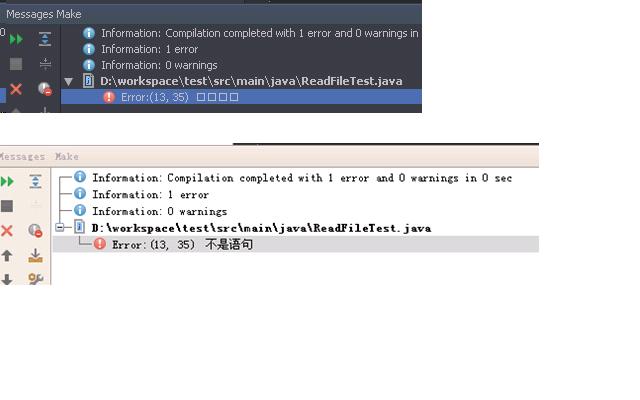
I set IDEA theme to Darcula look and feel. When some class build failed, error informations in Messages[Alt+0] window will display error if informaion contains chinese charactor.
But After changing theme to Alloy.IDEA Theme, IDEA can display chinese character correct in Messages[Alt+0] window.
Attachment(s):
error.JPG
Please sign in to leave a comment.
Can you provide a sample file/project which produces such a message on compilation?
Denis
You can create a java class that cannot be compiled successfully.
For example:
public class Test{
aaaaa;
}
Please conferm your OS's locale is chinese.
You can follow this web page to change locale. http://java.com/en/download/help/locale.xml
So, that chinese characters come as a compiler message and not as a source file part, right?
Denis
The problem is caused by a different font used in Settings | Appearacne | Look&Feel, you can override the default there with another font that has chinese glyphs.