On the Mac, option+enter suddenly stopped working!?
Answered

I am surely missing something.
- I write List<String> ...
- At this point the IDE wants me to choose from a list of List declarations :-). So, it wants me to press option+enter to show that dropdown.
- This is what it looks like (see below).
- I press the option key and enter key simultaneously, and nothing happens!
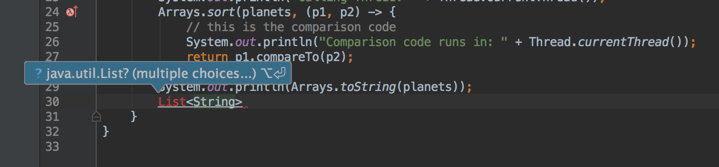
This is really annoying. I have used this thousands of times. I did not change my keyboard settings on Mac.
What must be going on?
Please sign in to leave a comment.
Alright. As I was typing my question above, I suddenly looked at the "Keyboard type" I was using. Since I use multiple keyboards, it looks like this:
And when I was using the U+ keyboard, this problem showed up! U+, btw, is very useful to enter Unicode codepoints on the Mac (using the option key).
When I switched to the U.S. keyboard as shown above, things got back to normal!
Wow. I reinstalled IDEA for this :-( -- should have known better. Sharing here in the hope that it might help others.
My problem was in java. I was writing code in the class itself and not in a method. so there was other errors preventing option Enter to suggest creating a method
Found this on Google when my option + enter stopped working. I realized it's because I have a version-controlled "project" as a composer package within a WordPress install. When i have the WP root directory open as a project, for some reason the opt + enter is disabled for the subproject, even though I can edit the files in the subproject.
To Jetbrains team: I'm guessing it's an indexing issue? But at least give an error message when someone tries to use opt + enter in a subproject file instead of nothing happening.. just seems like something is wrong with the IDE.
It doesn't look right, I'd recommend contacting support at https://intellij-support.jetbrains.com/hc/requests/new with the sample project to reproduce the issue. It's either a bug that needs to be fixed or some project configuration issue.