Mac CPU while writing code with IntelliJ and bugs

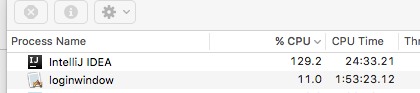
I have been working with Webstorm on mac for years and I love it. Recently I had to switch to IntelliJ ultimate to work on an actionscript project and I was very disappointed. One of the most annoying things is that the program consume so much CPU even in ideal mode where I don't type anything nor connected to the flash debugger. This really slows down my mac and makes the fan work constantly.
Another very annoying issue I found is that when I search and click one of the search results to get directly to the line - it opens a NEW editor tab (while I already have this one opened) and this creates collisions between the tabs (seems that one is in-project and under source control and one isn't) and sometimes the IDE gets confused and then one file is reverted. I lost some time fighting this until I figured it out.
Last annoying thing - cmd+shift+R - in webstorm it opened a quick search and I got the list of the files as I typed. not in IntelliJ.

Are these known issues? Is it the ActionScript/flex plugin?
Please sign in to leave a comment.
> One of the most annoying things is that the program consume so much CPU even in ideal mode where I don't type anything nor connected to the flash debugger. This really slows down my mac and makes the fan work constantly.
https://intellij-support.jetbrains.com/hc/articles/207241235
> Another very annoying issue I found is that when I search and click one of the search results to get directly to the line - it opens a NEW editor tab
Check the project structure, make sure you don't have duplicate roots added that contain the same files.
> Last annoying thing - cmd+shift+R - in webstorm it opened a quick search and I got the list of the files as I typed. not in IntelliJ.
Navigate | File, you may have different keymap selected.