Intellij does not show warnings

I am using IntelliJ 14.0.3 Community Edition. What I would like is for IntelliJ to show me warning in the Messages Windows and/or the Problems Scope. Warnings do indeed show up as little yellow lines in the Editor window and in Analysis; however, this is not very useful if you are trying to track down warning in other files without first having to opening each of them.
I have looked for some setting or switch within IntelliJ, but I have not found anything. It really would be nice that when you compile/make/build, all warning showed up in Messages Window and/or Problems Scope just like errors do.
One more thing. Another person here is using Eclipse (Luna) and can see both errors and warnings in Eclipse's Problems Window.
Any ideas? Thanks.
Please sign in to leave a comment.
Compiler warnings can be enabled per http://stackoverflow.com/a/4745610/104891 .
If you need the list of all the problems via the Inspections, run Analyze | Inspect Code.
Thanks for the information, I appreciate it. I guess my issue is that I really do not understand the meaning of what a warning is. I do indeed see "compiler" warnings in the Messages Windows. However I do not see these warnings that are being shown here:
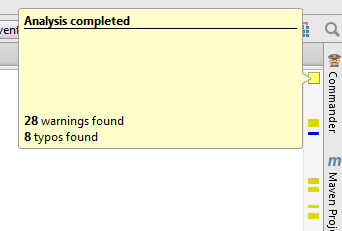
It is saying that there are 28 warnings found. However, these do not show up. So there is no way to get these sort of "warnings" to show up in at least the Messages window?
I am trying to get people to switch to IntelliJ but this feature/issue is holding up progress in doing that...
These warnings are detected by the inspections. To get the full list run Analyze | Inspect Code.
Okay, thanks. I appreciate the help.