Enter key not selecting dropdown items
Answered

Hopefully I can describe this correctly. It's really annoying. It hasn't always done this, so I'm not sure if I accidentally remapped a keystroke or changed some setting. Using 2016.1.3 on OS X with default 10.5+ keymap.
Suppose I have a small block of code like this:
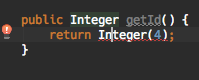
When I hit alt+enter it correctly brings up the suggestions and you can see "Insert new" is highlighted:
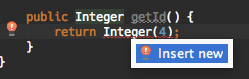
However, when I hit enter here, it does not select "Insert new" it just inserts a newline into the editor where my cursor was:
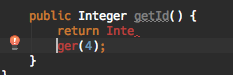
Any ideas? This happens with anything that pops up like that as a tooltip/suggestion. Enter just inserts a newline.
Please sign in to leave a comment.
Please submit a bug at https://youtrack.jetbrains.com/issues/IDEA and attach idea.log to the issue (https://intellij-support.jetbrains.com/hc/articles/207241085). Thank you.
Hello did you manage to fix it? Was it some settings? I have the same issue and cannot resolve it. It is quite annoying :(.. please help :)
Setting actionSystem.noContextComponentWhileFocusTransfer to true in the registry did the trick.
(Invoke Cmd+Shift+Alt+/, choose Registry)
Not sure how it got set to false.
Yes, it was answered here: https://youtrack.jetbrains.com/issue/IDEA-158199.
Thanks
Does not work in my case ;(.. I have it set to true, I tried to do the roundtrip setting false restart test, and setting true restart test and does not work :(
I filed new record: https://youtrack.jetbrains.com/issue/WEB-26507 for the reference
I think I found it:
Keymap:
Editor Actions:
Choose lookup Item and Invoke Complete Statement: has shift+cmd+enter added enter
Complete Current statement: has shift+cmd+enter added enter
..
New line kept enter
Seems to work