Maven - can't see conflicts
Answered

I can't see dependecy conflicts in the Maven Projects tool and in the dependency diagram. The Maven Projects tool used to show omitted dependencies with a message, e.g.

And the dependecy diagram contained red edges to the omitted dependecies. Now, the omitted dependecies are not shown at all.
I use IDEA Ultimate 2016.1.
Is there any way to get the conflicts marked again?
Please sign in to leave a comment.
https://youtrack.jetbrains.com/issue/IDEA-153544 may be related. Please share a sample project to reproduce this problem. Thank you.
Even new project with following pom doesn't show the conflicts:
Can't reproduce in 2016.1.2 EAP (https://confluence.jetbrains.com/display/IDEADEV/IDEA+2016.1+EAP):
I see this: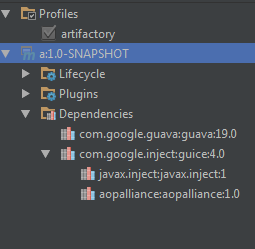
I noticed that the conflicts were shown for some maven projects until I reimported them.
Try re-importing with Maven 3.3 or later:
Thank You. It's working.
I have one other problem. For some maven projects named version-SNAPSHOT, it doesn't update dependecies according to changes in pom until I change version in pom e.g. to version-SNAPSHO. It doesn't work with auto-import enabled and also on manual reimport. If I delete everything from the pom beside the groupId, artifactId and version, it still behaves the same way.
Please report a bug at https://youtrack.jetbrains.com/issues/IDEA with a sample project and the steps to reproduce.