Kotlin visually changing Java code: How do you toggle Kotlin auto-formatting of Java code?
Answered

Disabling the Kotlin plugins in IDEA 2018.1.3 (Ultimate Edition) does not disable the auto-formatting (is that the correct term?) or kotlin-ization of my Java code.

If I hover my mouse, I see the overlay of the Java code and after clicking on that Kotlin-ized syntax, it changes it back to my original Java code.
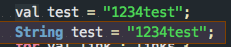
How do I disable or toggle this Kotlin-ization of my Java code?
See also my other post on SO: https://stackoverflow.com/questions/50612266/intellij-idea-toggle-kotlin-auto-formatting-of-java-code
Please sign in to leave a comment.
Please see https://stackoverflow.com/a/43680500/104891.
@Serge: Thank you very much! That worked! Code folding features have to be toggled on or off.