Unable to run maven install from Idea for Java 9 (tools.jar not found)

I migrated my project from Java 8 to Java 9. Now when I run maven install on this project inside Intellij Idea it fails with the following error:
[ERROR] Failed to execute goal org.apache.maven.plugins:maven-compiler-plugin:3.7.0:compile (default-compile) on project tutorial: Fatal error compiling: tools.jar not found: C:\Program Files\Java\jdk-9.0.1..\lib\tools.jar -> [Help 1]
Idea runs the following command:
"C:\Program Files\Java\jdk-9.0.1\bin\java" "-Dmaven.multiModuleProjectDirectory=C:\Users\User\workspace\tutorial" -Dmaven.home=C:\Users\User\install\apache-maven-3.3.9 -Dclassworlds.conf=C:\Users\User\install\apache-maven-3.3.9\bin\m2.conf "-javaagent:C:\Program Files\JetBrains\IntelliJ IDEA Community Edition 2017.3.2\lib\idea_rt.jar=63961:C:\Program Files\JetBrains\IntelliJ IDEA Community Edition 2017.3.2\bin" -Dfile.encoding=UTF-8 -classpath "C:\Program Files\JetBrains\IntelliJ IDEA Community Edition 2017.3.2\lib\idea_rt.jar" com.intellij.rt.execution.CommandLineWrapper C:\Users\User\AppData\Local\Temp\idea_classpath org.codehaus.classworlds.Launcher -Didea.version=2017.3.2 -s C:\Users\User\.m2\settings.xml install -DskipTests -P localhost
It works fine if I run mvn install from Windows command line (using the same maven installation as Idea). It also works from Idea if I downgrade to Java 1.8.
All settings point to Java 9:
C:\Users\User>java -version
java version "9.0.1"
Java(TM) SE Runtime Environment (build 9.0.1+11)
Java HotSpot(TM) 64-Bit Server VM (build 9.0.1+11, mixed mode)
C:\Users\User>echo %JAVA_HOME%
C:\Program Files\Java\jdk-9.0.1
C:\Users\User>echo %JRE_HOME%
C:\Program Files\Java\jre-9.0.1
C:\Users\User>echo %IDEA_JDK%
C:\Program Files\Java\jdk-9.0.1
C:\Users\User>echo %IDEA_JDK_64%
C:\Program Files\Java\jdk-9.0.1
In Idea the following settings all point to Java 9:
Project Structure->Project Settings->Modules->Sources->Language level:
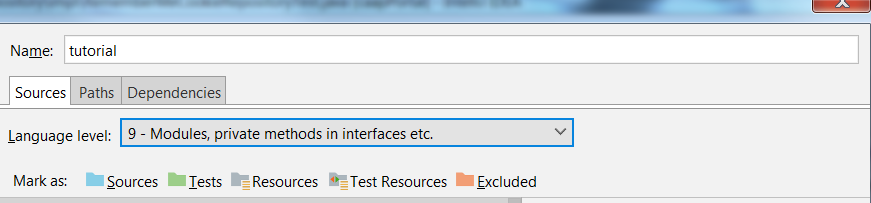 Project Structure->Project Settings->Modules->Dependencies->Module SDK:
 File->Settings->Build, Execution, Deployment->Build Tools->Maven->Runner->JRE:

However Idea shows JAVA_HOME as pointing to 1.8 in settings, while environment variables point to 1.9:

Relevant fragments of my pom:
<plugin>
<groupId>org.apache.maven.plugins</groupId>
<artifactId>maven-compiler-plugin</artifactId>
<version>${maven-compiler-plugin.version}</version>
<configuration>
<source>${java.version}</source>
<target>${java.version}</target>
<testSource>${java.version}</testSource>
<testTarget>${java.version}</testTarget>
<compilerArgument>-Xlint:all</compilerArgument>
<showWarnings>true</showWarnings>
<showDeprecation>true</showDeprecation>
<meminitial>${maven-compiler-meminitial}</meminitial>
<maxmem>${maven-compiler-maxmem}</maxmem>
<compilerArgs>
<arg>--add-modules</arg>
<arg>java.xml.bind</arg>
<arg>--add-modules</arg>
<arg>java.se.ee</arg>
</compilerArgs>
</configuration>
</plugin>
<properties>
<java.version>9</java.version>
<maven-compiler-meminitial>512m</maven-compiler-meminitial>
<maven-compiler-maxmem>1024m</maven-compiler-maxmem>
<maven-compiler-plugin.version>3.7.0</maven-compiler-plugin.version>
</properties>
My Idea version:
Intellij IDEA 2017.3.2 (Community Edition) Build #IC-173.4127.27, built on December 25, 2017 JRE: 1.8.0_152-release-1024-b8 amd64 JVM: OpenJDK 64-Bit Server VM by JetBrains s.r.o
I downloaded latest version (2017.3.4) and removed settings folder (<SYSTEM DRIVE>\Users\<USER ACCOUNT NAME>\.<PRODUCT><VERSION>), but it didn't help.
I would be grateful for any tips what could be wrong.
Please sign in to leave a comment.
Try with https://www.jetbrains.com/idea/nextversion/.
If the issue persists, please file a bug at https://youtrack.jetbrains.com/issues/IDEA and attach a sample project to reproduce.
After switching to 2018.1 Release Candidate version and bundled Maven 3 problem disappeared.
Thanks for hint.