Problem with build-in git
Answered

Hello,
i have problem with build-in git, i cannot push or pull, due some error that occurred recently.
Push failed
Failed with error: cannot spawn C:\Users\stefa\.IntelliJIdea2018.1\system\tmp\intellij-git-ssh.bat: No such file or directory
unable to fork
This is the error that i get. I tried updating IntelliJ from 2018.1 to 2018.1.2, clearing cache, disabling defender and etc but there is no hope.
I think that it may be some problem with permissions, but a looked and i have the right permissions.
Also this is very strange, when i try to access this file manually (right click on it) i get this error.
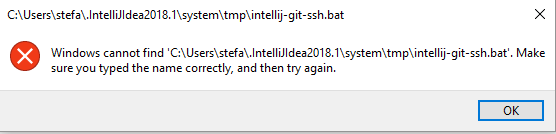
Please help.
Best regards, Stefan
Please sign in to leave a comment.
Related bug report https://youtrack.jetbrains.com/issue/IDEA-183224.
Do you have any other antivirals installed besides Windows Defender?
Maybe there is some policy active that doesn't permit running files from the user home directory?
i don't use any other antivirus, and searched all over the internet and didn't find solution (saw this post)
Where can i look for policies that may permit running files?
Software Restriction Policies: http://www.fatdex.net/php/2014/06/01/disable-exes-from-running-inside-any-user-appdata-directory-gpo/
UPDATE:
i changed my remote, i used ssh URL, now i changed it to http, and it worked fine.
what might be the problem with my ssh?
The problem is not with SSH, the problem is with some permissions on your system. SSH Git URL requires the use of this .bat wrapper which doesn't work on your system for some reason.
I fixed the problem with windows cannot find file.
Somehom my ComSpec variable was modified, so i restored it to normal and worked.
But now i have different error.
failed to restrict file handles (2)<br/>cannot spawn C:\Users\stefa\.IntelliJIdea2018.1\system\tmp\intellij-git-ssh.bat: No such file or directory<br/>unable to fork
[SOLVED]
after fixing the ComSpec variable, simple restart to reload System variables will fix the problem.
Thank you for you help.
Serge, sorry to open up this old thread, but I'm experiencing the exact issue you described: our local admins have implemented strict software policies that prevent apps and scripts from running from untrusted locations. Sadly, the user's home directory is considered untrusted.
So my question is this: do intellij-git-ssh.bat and intellij-git-askpass.bat have to live in a folder under the %USERPROFILE% directory (in my case that's C:\Users\USERNAME\.PhpStorm2018.1\system\tmp)? The software policy that prevents executables from running from here breaks the Git integration within PhpStorm.
Looking at those batch files, there doesn't seem to be anything in them that is user-specific; just a simple Java command. Could these be placed in C:\Program Files\JetBrains\PhpStorm 2018.1.3 along with the rest of the IDE code?
The files are re-generated on every run, that is why they appear in the IDE's temp folder, which is by default in your user folder. It is needed to ensure there are permissions to write to the folder and execute.
There seems to be no way of changing the location of files creation via IDE settings. It is possible to configure a custom location for the IDE folders though. You could try configuring IDE to store data in some other location than user profile, that is whitelisted by the execution policy. See https://intellij-support.jetbrains.com/hc/en-us/articles/207240985
I have solved the problem , able to do Git Pull/Push successfully from Intellij:
No need to re-install Git/Intellij. Just go to IntelliJ-> project Settings->Git-> uncheck "Path to Git Executable" ( This will automatically pop-up with C:/Users/<UserName>\AppData\....\Git.exe
Restart Intellij and try to do Git-> pull .
Note: Keeping credential-manager will help to avoid entering password again.
Let me know if you still face any issue.