Problem with creating Docker remote interpreter. Error: repository docker.io/pycharm_helpers not found: does not exist or no pull access
Answered

Hey,
When I'm trying to create remote interpreter with docker I'm getting following error message:
repository docker.io/pycharm_helpers not found: does not exist or no pull access
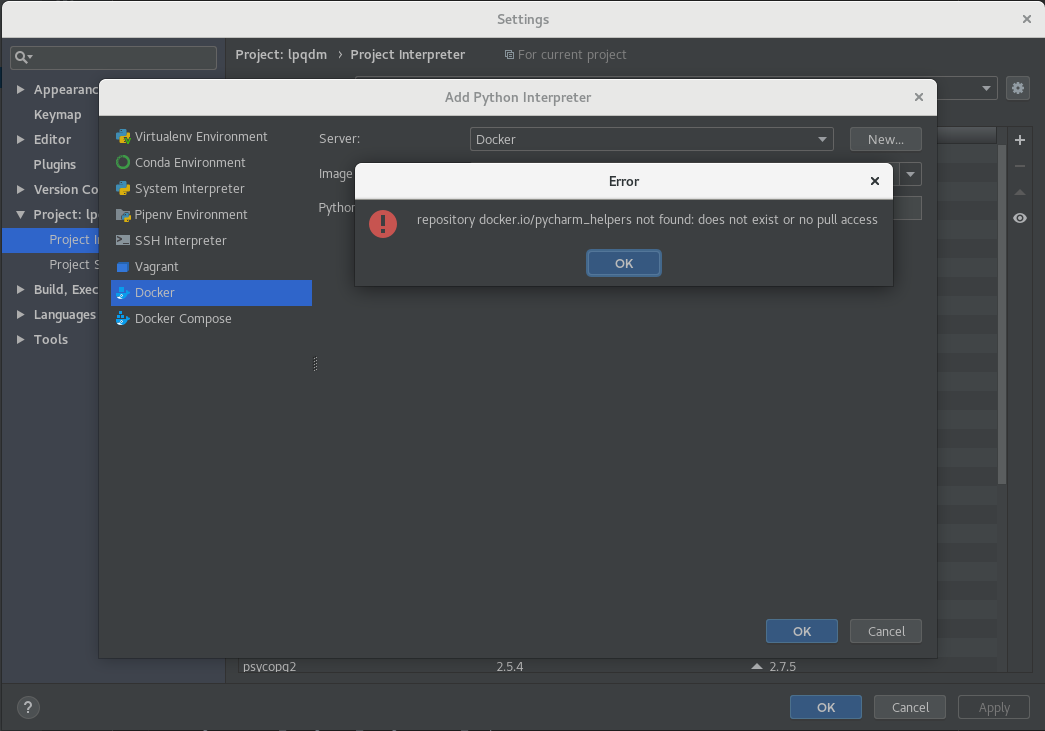
Is there any way to workaroud this issue by creating pycharm_helpers image manually?
idea.log:
2018-08-01 11:06:43,372 [ 547941] INFO - .CloudSilentLoggingHandlerImpl - Unable to find image 'pycharm_helpers:PY-182.3684.100' locally
2018-08-01 11:06:51,302 [ 555871] INFO - .CloudSilentLoggingHandlerImpl - repository docker.io/pycharm_helpers not found: does not exist or no pull access
Version: 2018.2
Build: PY-182.3684.100
Please sign in to leave a comment.
To communicate with Docker daemon did you open a port such as 2375 when you run a command 'dockerd'?
I have same issue.
I guess pycharm's internal code tries to pull that repository.
But "docker.io/pycharm_helpers" repository is unreachable for some issue(probably doesn't existing or forbidden I think)
Hello!
Thank you for contacting PyCharm support and sorry for a late response.
We are aware of this problem and already have related tickets in our issue tracker https://youtrack.jetbrains.com/issue/PY-29161
It should be fixed in 2018.3
You could try it in EAP https://www.jetbrains.com/pycharm/nextversion/ and please let us know if something goes wrong.
Please do not hesitate to ask any questions.
Kind regards,
Sergey
https://www.jetbrains.com
The Drive to Develop
When will 2018.3 be released? I am getting this same error and would like to know if I need a work around. I tried finding "beta" updates but it doesn't list any.
Hi Xandria,
Thank you for contacting PyCharm support.
Have you tried it in EAP? (the link to download is above in previous message).
Looking forward to your reply.
Kind regards,
Sergey
https://www.jetbrains.com
The Drive to Develop
Can you fix this in pycharm 2018.1? I have a perpetual fallback license on 2018.1.