Unable to println special characters in Kotlin REPL
Answered

I tried `println` in Kotlin REPL and want to print some special charactors, but failed with the following error:
println("Δ")
Internal error occurred. Please, send report to developers.
exception: java.nio.charset.MalformedInputException: Input length = 1
    at java.base/java.nio.charset.CoderResult.throwException(CoderResult.java:281)
    at kotlin.io.ConsoleKt.tryDecode(Console.kt:198)
    at kotlin.io.ConsoleKt.readLine(Console.kt:162)
    at kotlin.io.ConsoleKt.readLine(Console.kt:149)
    at org.jetbrains.kotlin.cli.jvm.repl.reader.IdeReplCommandReader.readLine(IdeReplCommandReader.kt:22)
    at org.jetbrains.kotlin.cli.jvm.repl.ReplFromTerminal.one(ReplFromTerminal.kt:98)
    at org.jetbrains.kotlin.cli.jvm.repl.ReplFromTerminal.doRun(ReplFromTerminal.kt:69)
    at org.jetbrains.kotlin.cli.jvm.repl.ReplFromTerminal.access$doRun(ReplFromTerminal.kt:38)
    at org.jetbrains.kotlin.cli.jvm.repl.ReplFromTerminal$Companion.run(ReplFromTerminal.kt:175)
    at org.jetbrains.kotlin.cli.jvm.K2JVMCompiler.doExecute(K2JVMCompiler.kt:105)
    at org.jetbrains.kotlin.cli.jvm.K2JVMCompiler.doExecute(K2JVMCompiler.kt:63)
    at org.jetbrains.kotlin.cli.common.CLICompiler.execImpl(CLICompiler.java:107)
    at org.jetbrains.kotlin.cli.common.CLICompiler.execImpl(CLICompiler.java:51)
    at org.jetbrains.kotlin.cli.common.CLITool.exec(CLITool.kt:96)
    at org.jetbrains.kotlin.cli.common.CLITool.exec(CLITool.kt:72)
    at org.jetbrains.kotlin.cli.common.CLITool.exec(CLITool.kt:38)
    at org.jetbrains.kotlin.cli.common.CLITool$Companion.doMainNoExit(CLITool.kt:171)
    at org.jetbrains.kotlin.cli.common.CLITool$Companion.doMain(CLITool.kt:162)
    at org.jetbrains.kotlin.cli.jvm.K2JVMCompiler$Companion.main(K2JVMCompiler.kt:329)
    at org.jetbrains.kotlin.cli.jvm.K2JVMCompiler.main(K2JVMCompiler.kt)

Internal error occurred. Please, send report to developers.

Process finished with exit code 2
Also, `println` is working like `print`, which is pretty weired.
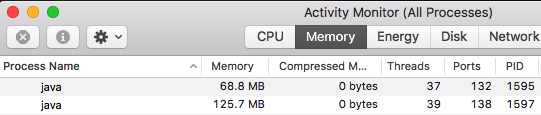
Also, I monitored the processes, when I open Kotlin REPL, it starts 2 java processes and makes it very lag to continue, so I have to kill one java process. Here's the screenshot:
I tried clearing cache, reinstall IntelliJ, restart my computer, none of them worked. Any ideas?
Here's the whole steps I met: https://stackoverflow.com/questions/50302215/kotlin-println-special-characters
Please sign in to leave a comment.
Please use https://discuss.kotlinlang.org/ for any questions related to Kotlin or report a bug directly at https://youtrack.jetbrains.com/issues/KT.