How to make an effective indentation?

I am still an inexperienced user of IntelliJ.
Besides, I do not speak English well. So it is difficult to set the program. Of course, IntelliJ is very comfortable when it comes to developing the java language (thanks to the developers).

One of the inconveniences is indentation.
I tend not to bracket well (although it is a bad habit in practice!).
However, if you do not write the square brackets and press Enter as shown in the picture, the cursor goes to the place I did not intend.
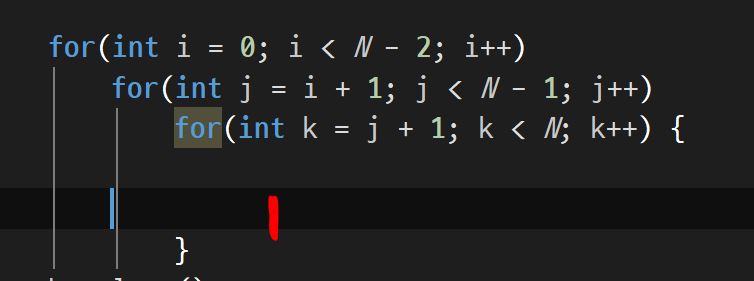
I want the cursor to move automatically to the red mark.
In addition, I've obviously created a blank with the "Tab" key, and when I go to the next line and delete it with "BackSpace", it is sometimes recognized as "Space". In other words, if "Tab" occupies 4 spaces, I mean 4 should be erased. Is this a bug? Or am I setting the wrong thing?
I would really appreciate it if you answered!
Please sign in to leave a comment.
What do you mean by the square brackets? Did you mean the curly brackets? You don't write the curly bracket at the end and still expect indentation?
Backspace behavior can be configured here:
Thank you for answer. And I'm sorry.
Because English is not fluent, I use a translator.
If the sentence is strange, I would appreciate it.
As you can see in the picture above, if I use "{}" only in the third loop, the beginning of the sentence in the third loop is not red. Start with a blue cursor.
Is it a minor inconvenience but can it be fixed?
I can't reproduce the issue, please provide the video of the problem, the sample project and the logs.
I'm sorry for late reply.
I recorded a video and how can I show it?
If you let me know your e-mail address, I will send it to you.
Please upload all the requested files per https://intellij-support.jetbrains.com/hc/articles/206869619.