PyCharm suggests/autoimports from wrong Reactstrap directory
Answered

For example, to make `Col` work, it needs to be imported as `import { Col } from "reactstrap";` But PyCharm keeps suggesting `import Col from "reactstrap/src/Col";`, which results in the React app not compiling:
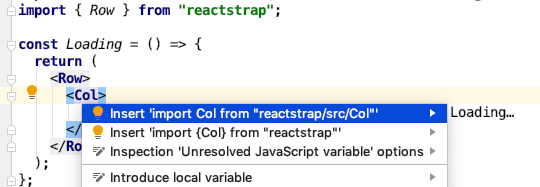
This also happens when I copy and paste some markup (for example a layout tree with rows, columns, etc.). Then, PyCharm automatically creates the wrong import statements which I then have to clean up afterwards.
How can I make PyCharm understand not to use the `src` folder?
Please sign in to leave a comment.
Hi,
Looking at the screenshot I can see that the second option is actually import { Col } from "reactstrap". Is there something wrong with it?
Or is it that you simply would like to get rid of the first option in the popup?
Yes, you're right in that the second option is correct. I'd like to get rid of the first one.
But, actually, more important than cleaning up this drop-down is when I paste large amounts of JSX and imports are added automatically. Because then I have to change all of them. E.g. by pasting something like [this](http://reactstrap.github.io/components/form/).
Logged as https://youtrack.jetbrains.com/issue/WEB-36070, please follow it for updates
Sweet. Thanks a lot :)
Sergey Karpov
My problem is worse than original issue.
PHPStorm 2020.2.1 suggests `import Col from "reactstrap"` which should be `import {Col} from "reactstrap"`
After autoimport
https://youtrack.jetbrains.com/issue/WEB-36070 isn't fixed yet. Please follow it to be notified on any progress.