Issue with Code Folding

Problem folding code in PyCharm Professional (2018.2.4)
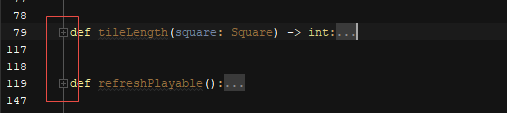
In the following fragment of code, two methods are collapsed to their headers. All appears well.
Clicking on the second method’s fold marker [+] causes it to expand as expected. Note the marker on the header points down as excepted. Clicking it again collapses the code back to its original state. So far, so good.
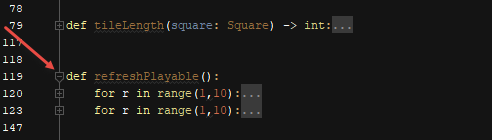
However … when I expand one of the collapsed blocks in the second method, or do other things such as introduce a blank line before or between the blocks, the direction of the marker on the header reverses to link to the header of the prior method!
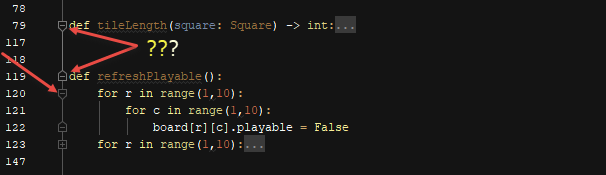
Clicking it now results in nonsensical folding of the code

This behaviour does not seem to be consistent across my files. Some methods and classes collapse and expand as expected. Other behave like this example. Am I doing something wrong or are there issues with PyCharm folding?
Please sign in to leave a comment.
Hi,
I am not able to reproduce it. Does the problem remain if you start with defaults? You can do that by renaming/removing configuration folder https://intellij-support.jetbrains.com/hc/en-us/articles/206544519. To make sure no custom plugin is responsible, you may rename/remove plugins folder as well.