Debug mode problem
Answered

After using the debug mode and pressing the stop button I can't return to the debug mode once again. I can use the return button but then the console restarts and all the local variables are deleted.
Can I return to the console with the local variables and run the debugger again? or I must press the return button?
os: windows 10
python: 3.6.8
pycharm: 2018.3.2
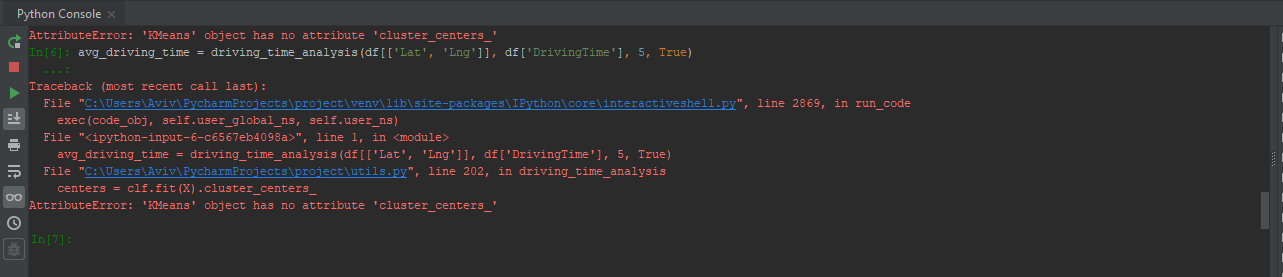
See the debug button is blocked.
Please sign in to leave a comment.
Hi,
You probably mix Python Console and Console of Debugger. On your screenshot there is a Python Console which isn't connected to debugger anyhow.
You can use both debugger and Python Console.
Or do I miss something?
I don't see the Debug near TODO.
That's probably because you haven't run it. Run debugger and you should see it there.
Oh, I'm sorry, I misunderstood. I see the problem now.
We will investigate.
Thank you very much! I was surprised by this problem.
Ok, seems to be the same problem described in https://youtrack.jetbrains.com/issue/PY-27179, please vote for it and follow for future updates.
It does not solve my problem. Lets say I press the debug button but afterward, I regret and I don't want to debug anything and want to go back.
by the way, the ticket was created a year ago. How can I make it work the same as you show me in your snip? where I have the debug near python console at the end of the window.
I stack in this window without the debug bar.
There is no solution indeed. We have assigned it to a developer to take a look.
>How can I make it work the same as you show me in your snip? where I have the debug near python console at the end of the window.
Just right click your script and choose Debug... . You can also do that from the menu Run | Debug... or in the right upper corner
See https://www.jetbrains.com/help/pycharm/debugging-your-first-python-application.html for more info
I did that but it doesn't appear where it should be. as you can see in the image I have attached.
Would be great to see some screencast.
You haven't mentioned that you tried to run debugger separately, only that you tried to attach it from Python Console.
Ok I have checked it out and if I run it separately it works fine. but lets say I have utils.py file which contains only functions and I want to debug one function. In order to do so, I need to open a new script and call the specific function? or there is another (more simple way) to debug it?
You can debug any python file and there is no need to open separate script for it. Please go through https://www.jetbrains.com/help/pycharm/debugging-your-first-python-application.html carefully. It describes how to debug your code in PyCharm.
However, it is not possible at the moment to debug only the part of the code, but there is a similar feature request in our tracker: https://youtrack.jetbrains.com/issue/PY-19692
Please vote for it and follow for updates.
Ok Sergey!
Thank you very much.