Broken text is printed to console in Spring project

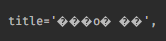
If the log message is written in non-ASCII word, whole text is broken in Run console.
But I already set encoding and character sets to UTF-8 like this:
<web.xml>
<filter>
<filter-name>encodingFilter</filter-name>
<filter-class>org.springframework.web.filter.CharacterEncodingFilter</filter-class>
<init-param>
<param-name>encoding</param-name>
<param-value>UTF-8</param-value>
</init-param>
</filter>
<filter-mapping>
<filter-name>encodingFilter</filter-name>
<url-pattern>/*</url-pattern>
</filter-mapping>
<source file>

<Tomcat server.xml>
<Connector port="8090" protocol="HTTP/1.1" connectionTimeout="20000" redirectPort="8443" URIEncoding="UTF-8" />
<HTML: head tag>
<meta http-equiv="Content-Type" content="text/html; charset=UTF-8"/>
What is the problem?
Please sign in to leave a comment.
Hi.
Please try following this advice:
https://www.jetbrains.com/help/idea/configuring-output-encoding.html
Unfortunately, I already added the option but it didn't help.
Does https://stackoverflow.com/a/55118434/104891 help?
If your case is different, please share a small sample project to reproduce the problem: https://intellij-support.jetbrains.com/hc/articles/206869619.
https://stackoverflow.com/a/55118434/104891
Can I use this solution to plain Spring MVC project? Or is it for Spring Boot only?
This solution is Spring Boot specific. If it's not your case, we'll need a sample project showing the issue.
I solved it with adding -Dfile.encoding=UTF-8 VM option to Tomcat separately.
(Run/Debug Configurations)
Thanks for the information! I wonder if we should do it by default for the app servers as we do for all the other Run/Debug configurations.
As I know, Eclipse does. It would be better if IntelliJ applies UTF-8 encoding to the servers by default.