How can I search in comments and strings for the current module only?

When I activated the "search in comments and strings" option in the rename dialogue window the search for comments/strings takes place - in contrast to the search when this option is unchecked - across all kind of modules. According to the name of this option, I would have expected nothing to change in the behavior of the renaming, except that comments and strings are also searched for the inputted variable name.
For example: I want to rename the variable "dataset" into "dataset_renamed"
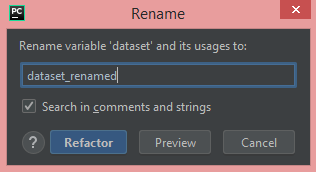
Clicking on the preview button gives me the following

It found comments/strings containing the word "dataset" in 147 different files.
When I do the same without having checked the "Search in comments and strings" option, the preview contains only stuff of the current module.

Why does renaming take place across modules when the "Search in comments and strings" option in the renaming dialogue window is activated? How can I search in comments and strings for the current module only?
Please sign in to leave a comment.
>How can I search in comments and strings for the current module only?
Currently, you cannot do that when you do Refactoring. In order to set scope for current file, you can use Find and Replace https://www.jetbrains.com/help/pycharm-edu/finding-and-replacing-text-in-project.html, though there is also no option to search only in comments, but you can always exclude needed occurrences.