Beginner's question on scientific view

1) If I plot something when in scientific view, like in this example: https://www.jetbrains.com/help/pycharm/matplotlib-tutorial.html then run the same script again, I see the previous + the new plots all together in the "plots" tab on the right. Is there a way to close the old plots when running a new script? Otherwise it gets too cluttered too quickly.
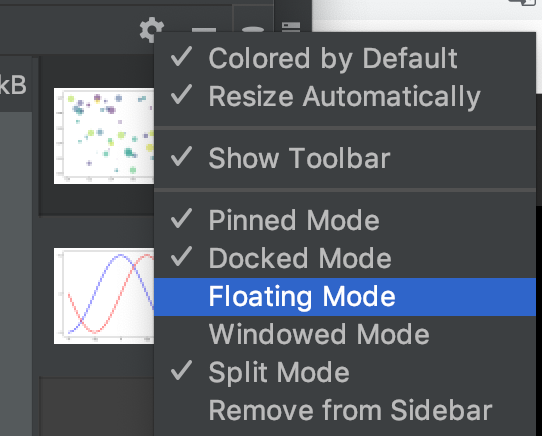
2) Is there a way to show plots in separate windows, the way Spyder does? Sciview seems much more limited (harder to zoom, doesn't track x and y coordinates, etc
3) Is there a way to show the sizes of array, like Spyder does (see these screenshots: http://www.psych.mcgill.ca/labs/mogillab/anaconda2/lib/python2.7/site-packages/spyder/doc/variableexplorer.html )
Right now the variable explorer at the bottom right lists the variables; if I click on 'view as array' I can browse the content of arrays, but the shape is not displayed immediately. getting the shape of a numpy array is OK, but getting that of a pandas dataframe requires you click on the dataframe in the variable explorer and scroll all the way to the bottom to inspect the shape attribute. What I'd need is a way to immediately check if, say, 6 dataframes all have the same shape. With Spyder it's very straightforward. is there a similar way in PyCharm? Otherwise, to be honest, the 'scientific view' is quite pointless.
4) Is there any way to get a variable explorer or something similar outside of scientific mode?
Thanks!
Please sign in to leave a comment.
Hi John,
1) There is no such feature at the moment, unfortunately. Here is relevant issue https://youtrack.jetbrains.com/issue/PY-27614, please vote for it or submit another one if needed.
2) You can switch SciView tool window to Windowed or Floating mode:
3) There is no such feature yet. Please feel free to submit a feature request about it to our issue tracker using the link https://youtrack.jetbrains.com/issues/PY and let us know if you need any help.
4) Here is corresponding feature request https://youtrack.jetbrains.com/issue/PY-22064