PyCharm 2019.1 on macOS Mojave with keyboard layout U.S. International - PC (dead keys)
Answered

Under U.S International layout to get the single quote ' , I'm supposed to press the ' key followed by space . This works in all programs but not in PyCharm. As soon as I press ' in the editor I will get 
and when I press space it changes to
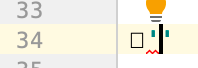
This forces me to backtrack delete the square symbol thing , and it's very annoying. In IntelliJ IDEA Ultimate this works. Is there any PyCharm specific setting that it's causing this? Or is this a bug that I should report
Please sign in to leave a comment.
Hi,
I'm sorry for inconvenience. The problem is known https://youtrack.jetbrains.com/issue/JBR-1311, please upvote and follow for updates.
Check possible workarounds in the description.
I'm having the same issue... But I don't have visual feedback of Pycharm...
In other text editor I have:
It make PyCharm useless for coding in Python here... :( I'm in today last release...
Mac OS Sierra 10.12.6
Hi everyone,
I have the same problem, so I downloaded the previous version (2018.3) that works fine.