Copy to clipboard and back loses first row

When I copy a few rows to the console (or an external text editor), editing them and copy the results back to the table, then the first row gets lost.
Example:
I copy the highlighted fields to the clipboard (ctrl+c). The CSV Format is comma-separated w/o header:

Then I paste it to the console to quickly edit the fields (e.g. with mutliple carets):

After the editing, I copy the fields back to the clipboard:

I paste it back to the same eight fields where I copied it from in the table. Then it does this:

It seems like the first field/row (Test4) has not been pasted to the table. When I copy the same clipboard entry into an external text editor (e.g. Notepad++), it shows this:
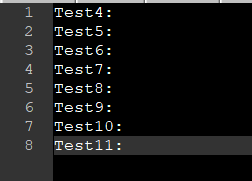
So the copy goes fine, all eight rows get copied. But when I paste into a database table in PyCharm, the first row gets lost.
To me it seems like the paste-process cuts the first row because the program thinks that this row is a header. When I add a "fake" header row...
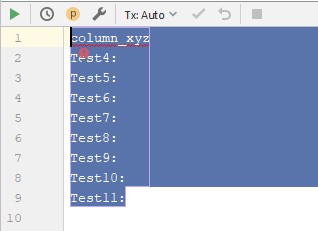
.. then paste it back to the database table makes the right result:
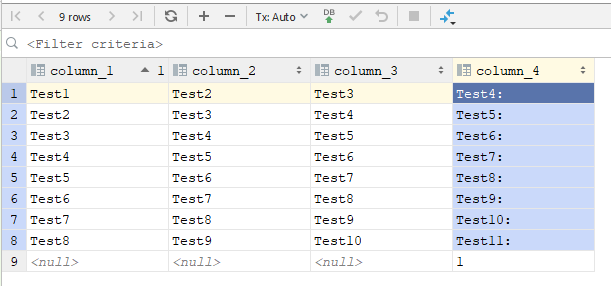
I already changed the settings at the CSV Format settings, but those are only for the copy process, but not for the paste like you see here.
Please sign in to leave a comment.
Hi,
Do you use any custom plugins for CSV files?
I had the CSV Plugin running from the Marketplace. I deactivated it and all other Downloaded Plugins. The problem still exists.
Another workmate has the same problem while having less plugins and less personal configurations active in PyCharm.
The version is 2019.1.2, Professional Edition. I had the problem since I started using PyCharm, should be at least versions 2019.X upwards.
I also tried all other Data Extractor Format and nearly every different configuration for every single one, all with the same result. If I paste something to an table, PyCharm always expects the first row to be a header and won't paste it but starting from the second row.
Please report at https://youtrack.jetbrains.com/issues/DBE and specify your and your collegue's OS, please also attach idea.log after reproducing and the screenshot similar to below:
Thank you.
Thank you Andrey Dernov. Your answer/screenshot gives me the solution.
The Options Menu, where you have the possibility to choose the Paste Format, is only visible if there is an Output (result) from a Statement shown in the console. I can choose my configured CSV Formats from here. The "Detect" Option loses the first row. Choosing my CSV Formats is enough for me, the first row doesn't get lost anymore with one of the CSV Formats.
I haven't found "Paste Format" in the PyCharm documentation.