IntelliJ icon are always displayed in the taskbar
Answered

When I build the project, a blank icon will appear in the taskbar, like this.
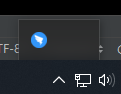
The mouse can be moved up on it, but clicking on it doesn't have any effect!
It is the process of IDEA, can be verified by Taskbar Icon Settings in Windows 10 system settings.

That useless after I close the option of "Display notification on build completion"

Please help me, thanks.
Please sign in to leave a comment.
By the way, When this icon appears, it will display in taskbar until IDEA is closed
Please see https://youtrack.jetbrains.com/issue/IDEA-207320 .
The issue will be fixed in the next build to be published at https://www.jetbrains.com/idea/nextversion/.
So, I can only wait for the IDEA update to fix this problem?
Yes.
OK, Thank you.