PyCharm remote interpreter package listing

Hello,
I am having a problem with package detection when using remote interpreter in PyCharm (2019.1.3). It works for some hosts, however when I attempt to connect into Docker container using ssh remote interpreter the package detection doesn't work. There are some interesting errors in the log when I attempt to reload the package list:

Manual running of "packaging_tool.py" with parameter "list" is working as expected and prints out all of the packages.
Remote Python console and code execution/synchronization also seems to work correctly, so it's just the package detection?
When I try to "Install packaging tools", this message pops up:

The host running PyCharm is Windows 10, Docker host is running ArchLinux and the container itself is built on Ubuntu.From the errors, I believe there is some kind of coding error, since the "[m" looks like carriage return?
I attempted to debug this problem, but PyCharm logs are not very helpful. Is there some way to enable debug outputs for "ckaging.InstalledPackagesPanel"?
Thank you,
Thomas
EDIT:
When I edit the "packaging_tool.py" to exit with non-zero exit code, the log contains this:
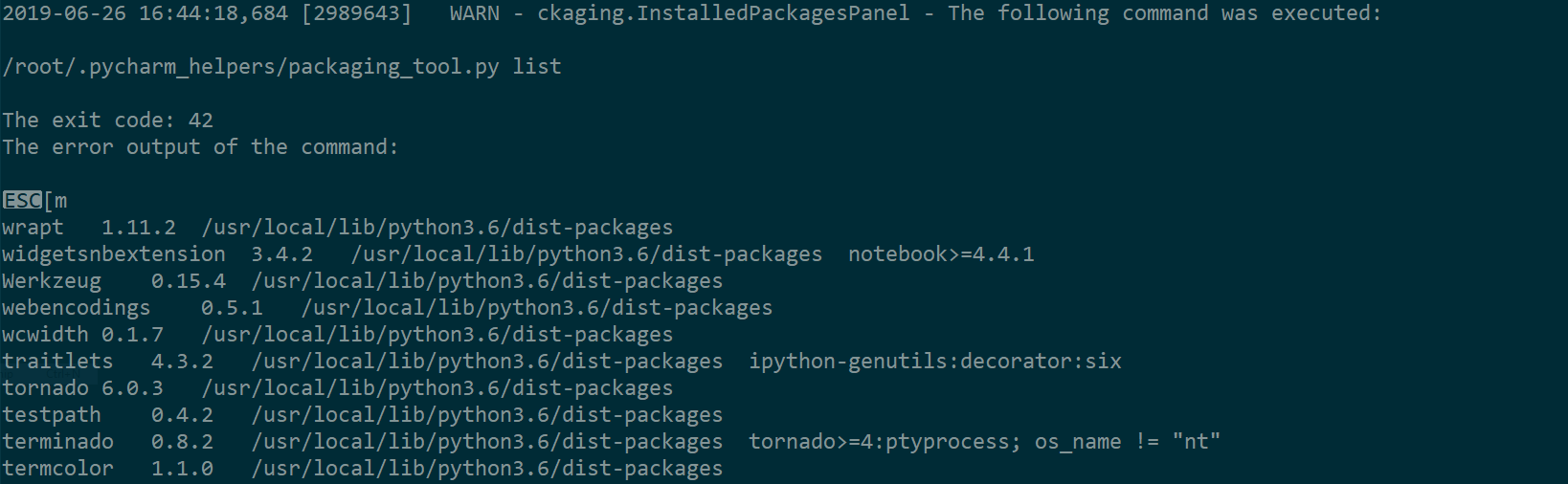
, so the package enumeration itself does work and the error is somewhere else...
Please sign in to leave a comment.
Hi,
Could you please let me know which docker image you are using to start the container?
I'll try to reproduce it on my end.
Hello,
Actually I found out, that the problem is only present in the container I am currently working on and it is not public yet. I think I found the reason for the error, this is the response from the container:
and this is the response from working container:
It seems, that the broken container is appending some additional characters "ESC[m" to the result.
EDIT:
In the end, the problem was definitely on my side. Once I removed my ~/.bashrc and /etc/bash/bashrc from the broken container, the problem went away. Thank you for your time!
Thank you for letting me know!
Glad that it works now.