Project View - broken filenames
Answered

any idea what i need to configure to get past this?
some context :
a) i have just installed new Linux Mint 19.2
b) changing from Darcula to IntelliJ themes has no effect (to resolve this issue at least)
c) installed IntelliJ IDEA Ultimate 2019.1.3
IntelliJ IDEA 2019.1.3 (Ultimate Edition)
Build #IU-191.7479.19, built on May 28, 2019
Licensed to MMI Group Limited / Bruce Hart
Subscription is active until December 1, 2019
JRE: 1.8.0_202-release-1483-b58 amd64
JVM: OpenJDK 64-Bit Server VM by JetBrains s.r.o
Linux 4.15.0-62-generic
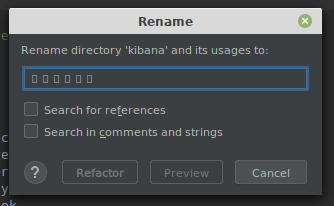
i'm thinking fonts/default encoding might be missing, but not sure where to look. (default is UTF-8)
any pointers would be greatly appreciated
many thanks
bruce
Please sign in to leave a comment.
Try changing the editor font in File | Settings | Editor | Font.
thanks, but no change
Please update to the current version available at http://www.jetbrains.com/idea/download/index.html and see if it helps.