Remote Debugger - weird path, "can't be found in project. "

Hi
After switching to version 2019 of Pycharm I've got a problem with remote debugger. It cannot find path of .py files, instead of real path It's displaying a disorted one, like it has some problems with encoding.
I'm getting a message like:
[...] can't be found in project. You can continue debugging, but without the source. [...]
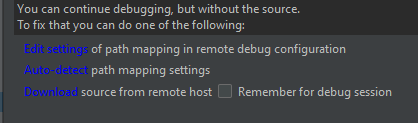
e.g. if file is in c:/directory I'm seeing c%3A%5Cdirectory
import pydevd
print pydevd.__version__
pydevd.settrace('localhost', port=6667, stdoutToServer=True, stderrToServer=True)
Please sign in to leave a comment.
Could you share a screenshot of your run configuration?
I'm running this script from interpreter embeded in Autodesk Maya 2017, it worked fine with previous version of PyCharm:
sys.version
# Result: '2.7.11 (default, Dec 21 2015, 22:48:54) [MSC v.1700 64 bit (AMD64)]' #
//EDIT
oh, right, run configuration of remote debugger:

I just tried starting a Python script with Maya interpreter and it worked fine after it connected to the debug server.
How do you start the script? Is it something like mayapy.exe script.py?
I'm experiencing the same problem, did you ever find a solution?
Try removing both pydevd and pydevd-pycharm packages from your interpreter, then install only pydevd-pycharm.
Apparently they conflict with each other.
https://youtrack.jetbrains.com/issue/PY-40661
same issue here, but the Andrey Resler 's link does not work