IDEA is hiding jars from me - how do I stop this?
Answered

I really hate this new "feature". I mean, why?
Please tell me I can switch it off, and see and rearrange my jar files again.
Please sign in to leave a comment.
Can you show this library in Libraries section of the Project Structure?
Do you use 3rd plugins? Please try with them disabled.
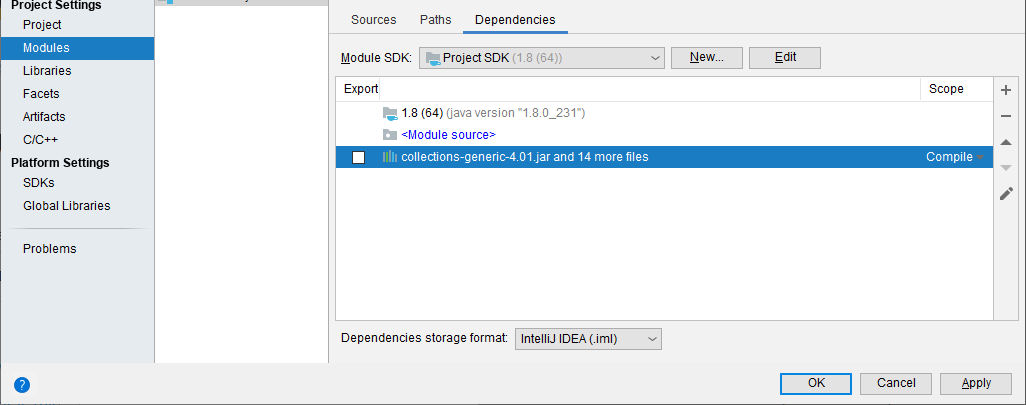
No, no Library is involved. I just added multiple jar files from a directory (from the "+" button selecting "jars or directories then doing multi file select), and this is what it shows.
No third party plugins.
What happens when you double click on this node?
A dialog "Configure Module Library" appears. But this isn't a library, it's a bunch of unrelated jars! I want to see them all listed in the Project Structure dialog as was always the case in the past.
> I just added multiple jar files from a directory (from the "+" button selecting "jars or directories then doing multi file select), and this is what it shows
There is no way to select multiple files in this dialog. You can choose multiple jars only when creating a library, not when adding individual jar to the dependencies.
If you need separate jars, add them one by one. If you need a library, use multiple selection for the jars when configuring a new library.
Not sure what you mean - there definitely is a way to select and add multiple jars - the file dialog supports multiple selection and that's exactly what I did!
I've had to remove the entry and add each jar separately. This is extremely tedious, not least because the dialog doesn't even open up with the last used directory showing, you have to navigate back to your jar files each time.
This never used to happen, I have always used multiple file selection to add jars to a new project in the past without them being collapsed to a "module library". What purpose is this supposed to serve? There is already a mechanism for defining libraries.
> Not sure what you mean - there definitely is a way to select and add multiple jars - the file dialog supports multiple selection and that's exactly what I did!
This doesn't work for me, multiple selection is not triggered when adding jars to module dependencies:
That's a different dialog to the one I get. Yours is called "Select Path", mine is called "Attach Files or Directories".
This is what I get when clicking the "+" button (circled).
Community edition 2019.2
Try the current version: http://www.jetbrains.com/idea/download/index.html .
It looks like a bug that is fixed in https://www.jetbrains.com/idea/nextversion/ .
See this link for details: https://youtrack.jetbrains.com/issue/IDEA-230707 .
I've checked that 2020.1 version adds multiple jars as you would expect.