Cant find download specific library from maven

The exact package I want is:
<!-- https://mvnrepository.com/artifact/androidx.work/work-runtime -->
<dependency>
<groupId>androidx.work</groupId>
<artifactId>work-runtime</artifactId>
<version>2.5.0-alpha03</version>
</dependency>
So I use the following syntax...
and search for "androidx-work:work-runtime:2.5.0alpha03" but nothing.
Even *:work-runtime:* returns nothing. How would I go about adding it without touching any other files.. For example if I search just "WorkManager" I get a giant list of packages with that class (but not androidx.work). From that giant list of packages I can click and install and then can import into my code without touching any other files. I would like to do this for this specific package.
The only workaround I have found is to download the .aar files directly and extract the .jar files and upload them manually as an external java library.
PLEASE HELP!
even the example search listed right under the search text for 'ant:ant-junit:1.6.5' returns nothing.
Please sign in to leave a comment.
> Note: this artifact is located at Google repository (https://maven.google.com/)
Did you add Google repository in pom.xml or in Maven settings.xml?
Thank you for the prompt reply!
I read online about this pom.xml file but have no idea what its about, I even tried creating one in every directory of my project with the content
<dependency>
<groupId>androidx.work</groupId>
<artifactId>work-runtime</artifactId>
<version>2.5.0-alpha03</version>
</dependency>
Clearly I have no idea what im doing... any guidance on how to achieve what you suggest?
See http://maven.apache.org/guides/mini/guide-multiple-repositories.html .
I still have no idea what about this pom file.
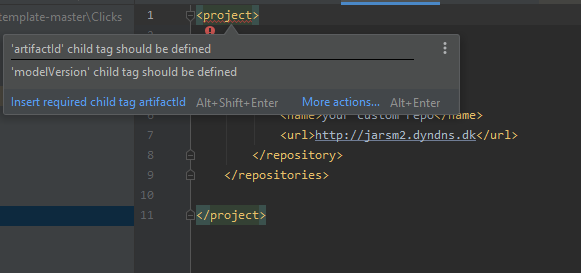
Where would I find it? would I need to create it? From what I read it should already be in my project root, but its not.
Do I need to make one? the link you gave me is about editing an existing pom file? I tried to create pom.xml again in my root directory with
Do you use non-Maven project and want to add Maven library to it?
I would recommend creating a new Maven project instead as this library has a lot of dependencies and it would be hard to manage it manually.
See https://www.jetbrains.com/help/idea/maven-support.html .
My project has just 1 external library not from Maven. But adding Maven libraries is as easy as typing and clicking the one I want.
Except I guess its not searching https://maven.google.com/
Is there no other way to make it just search maven.google? Is my workaround about just extracting the .jar files from the .aar files not viable since it seems alot simpler?
Thanks Ill await a reply then proceed to do as you suggest :(
It will be really painful to download and configure all the libraries and dependencies manually. IDE Maven library search uses the default repository, you can't customize it in a non-Maven project.
Ok thanks for your time Serge Ill do as you suggest.
Cheers!
So I created a new maven project, and edited my pom.xml file to:
Also I hope there wont be problems with the .idea stuff when I move all my project files from the old location into this one.
Oh sorry forgot now I need to add dependency, although I cant figure out how :S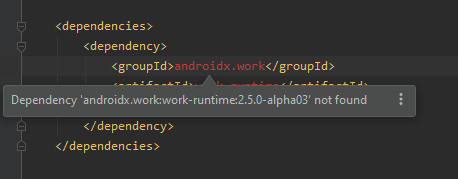

and it wont appear when I search for it =(
Well I gave up, ill just do things manually and keep reading jetbrain tutorials and documentation in the hopes i get it. Thanks again.
Hey Leathan7!
Maven is not the simplest thing to understand. I empathize with you because I have been there. It is tried and true though and widespread in usage.
In case you want to stick with Maven (it will help most Java developers in the long term unless they are already on Gradle), here are some reference to read.
Start with https://www.baeldung.com/maven that will get you started on basic file and get you to the compile stage.
Read more from these as you go https://www.baeldung.com/maven-guide
I think Gradle might be easier for you to get started. Gradle is an alternative to Maven which also pulls maven artifacts from maven repositories. Both are supported by IntelliJ/Idea. The configuration file is more readable for simple use cases. A simple example of gradle build file https://github.com/eugenp/tutorials/blob/master/gradle/gradle-employee-app/build.gradle
To add repository to Gradle
I hope that helps you to get started.