What do the background colors in Project view mean?
Answered

Seriously, what do they mean? Why have some dirs a different color?
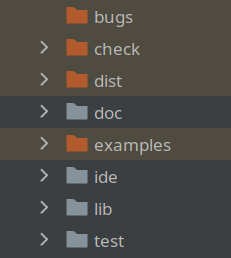
They have certainly no relation with my .gitignore file.
Please sign in to leave a comment.
Those orange folders are marked as Excluded (PyCharm doesn't build indices for them). You can change it by right-clicking the folder and choosing Mark Directory as, if needed.
More info can be found here https://www.jetbrains.com/help/pycharm/project-tool-window.html#content_pane
and here https://www.jetbrains.com/help/pycharm/content-root.html#root_types
Ah, right, thanks! I remember marking them many years ago, but totally forgot about the color.
I am about to post a related question, so I will add this here. What in the OP's Project tab does the tan/yellowish background color (not the orange folder coloring vs blue for example) mean? I hadn't loaded my project in a long time and all of sudden it's all different looking. So I googled example IntelliJ screenshots and did NOT see that coloring. What happened?
Hello Dan Delgado,
Non-Project files are marked with this color. Can be checked under Settings/Preferences | Appearance&Behaviour | File Colors. https://www.jetbrains.com/help/pycharm/settings-file-colors.html