How can I restore source/resource folder icons with a custom Gradle layout?
Answered

I'm setting up a Gradle project using the following configuration to adjust my project layout:
sourceSets { main.groovy.srcDirs = ['src'] main.resources.srcDirs('conf', 'resources') test.groovy.srcDirs = ['test']}
However, the directories in the project panel look like this:
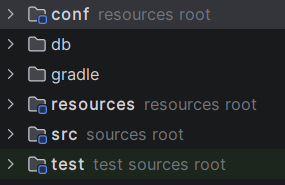
Instead of this:
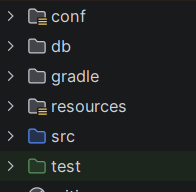
Is there anything I can do to get the correct icons back?
Thanks,
Kevin
Please sign in to leave a comment.
If you'd like this to be an option, you can file a feature request on our issue tracker at https://youtrack.jetbrains.com in the IntelliJ Platform project.
This is exactly the behaviour I want, however, I don't get the blue or green icons. I just get the icons representing modules and a description of the folder next to it. Is this the expected behaviour you're referring to?
Kshep92 Sorry that my last reply was based on a misread. Could you please share your IntelliJ IDEA version (Help | About)?
What you're seeing is related to how the Gradle import places the content root when you use a non-standard srcDirs path. When srcDirs points directly at a top-level directory like `code`, IntelliJ ends up treating that folder as both the module content root and the source root at the same time. In that situation it renders the content-root presentation (the folder-with-badge icon and the grey "sources root" label) instead of the plain solid-colored source-root folder.
A fix for this was shipped in IntelliJ IDEA 2024.3 in IDEA-163185, so if you're on an older version, upgrading should restore the colored icon. If you're already on 2024.3 or later, let us know and we can take a closer look at your build.gradle.
Bond Han Kindly see below my version information:
My build.gradle settings are as follows:
Kshep92 Thanks! This looks different. I have logged this as a separate bug: IDEA-390303 You can follow it for updates by clicking the star icon on the issue page. This article explains the options: https://intellij-support.jetbrains.com/hc/en-us/articles/207241135 Also please feel free to add any comments there in YouTrack.
Thanks very much Bond Han I'll follow the issue there.