How to disable this type of bracket auto-indentation?
Answered

When I am in a situation like this:

and press "Enter", what I get is this:
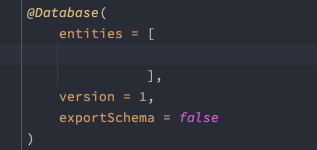
but what I want is this:

How can I achieve this? I do want the auto-indent, however IntelliJ seems to call what it is currently doing the "proper" indentation (based on my tinkering with the settings, see the "Editor > Smart Keys" section). I want to change that "proper" indentation to not align the brackets vertically.
I've also noticed that, if I remove the trailing comma after the closing bracket, then pressing Enter will indent how I want. This only happens for bracket pairs that aren't the first item in a list.
Note: I am using Android Studio, not pure IntelliJ, if that makes a difference.
Please sign in to leave a comment.
What file type/language do you edit? Java/Kotlin?
Does the issue occur in the current IntelliJ IDEA release as well?
I would report a request at https://youtrack.jetbrains.com/newIssue?project=IDEA with the sample file to reproduce attached + your code style exported from the IDE settings.