ArchUnit Run @ArchTest annotated fields

Preface
ArchUnit is a tool that enables writing unit tests to test architectural decisions. See: https://www.archunit.org/
There are three different ways to write ArchUnit Tests.
Some of them are strangely handled by IntelliJ.
1. Just use another test-framework to run the test.
Use <artifactId>archunit</artifactId> for the core features without extra integration to testing frameworks.
This is the most flexible, but also the most cumbersome and rarely needed.
You need to programmatically import the classes and manually check the rules on the classes.
Example: (see https://github.com/TNG/ArchUnit-Examples/tree/main/example-plain/src/test/java/com/tngtech/archunit/exampletest for more examples)
public class ArchitectureTest {
  @Test
  void test() {
    JavaClasses classes = new ClassFileImporter().importPackagesOf(Application.class);
    classes().that()...should()...check(classes);
  }
}
2. Annotate test method with @ArchUnit
This enables simpler importing of classes by annotating the test class with @AnalyzeClasses. The test-methods only parameter will provide the test with the classes. The analysed classes are cached by default and can be used in multiple test classes without analysing the classes multiple times.
This requires a test-framework specific integration dependency to work. E. g. <artifactId>archunit-junit5</artifactId> for junit-jupiter.
Example:
@AnalyzeClasses(packagesOf = Application.class)
public class ArchitectureTest {
  @ArchTest
  void testOnlyCalendarExists(JavaClasses classes) {
    classes().that()...should()...check(classes);
  }
}
3. Annotate field in test class with @ArchUnit
This is generally the preferred way to write ArchUnit tests. This further simplifies generating ArchUnit tests. Writing the rule and declaring the rule as a field in the test class is sufficient. the rule will automatically be checked against the classes that are analysed via the @AnalyzeClasses annotation.
Example: (see https://github.com/TNG/ArchUnit-Examples/tree/main/example-junit5/src/test/java/com/tngtech/archunit/exampletest/junit5 for more examples)
@AnalyzeClasses(packagesOf = Application.class)
public class ArchitectureTest {
  @ArchTest
  static final ArchRule test = classes().that()...should()..;
}
Weird Behaviour
Generally the tests will be run during the verify stage in a maven project by the surefire plugin. But there is also an option to directly run the tests directly in the IDE.
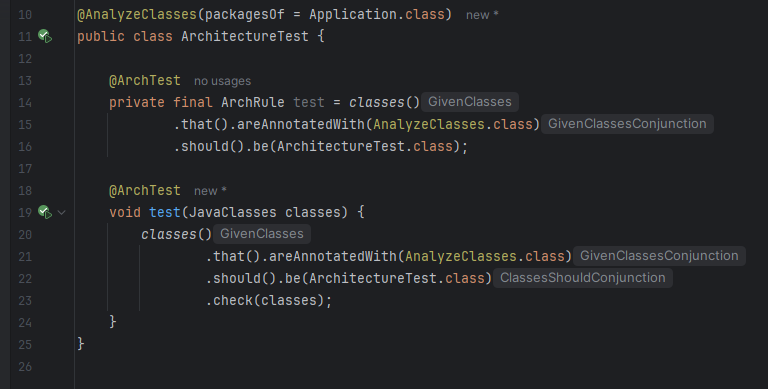
Strangely there is only a run button for methods that are annotated with @ArchTest. Annotated fields dont get a run method, so they can not be run independently. Also they are shown in a greyed-out colour hinting to the user that this field is not used, which is wrong.
When clicking on the run icon on the class level both tests are run. IMHO there should also be a run button for rules defined as fields.
Also @ArchUnit annotated tests only work when the class they reside in is annotated with @AnalyzeClasses. When its not; ArchUnit tests are not run. But the IDE does not reflect this. The same run buttons are still shown in the gutter. There should probably a message from the IDE that helps the developer by adding the needed annotation for them.

Further, the javadoc for @ArchUnit states that tests annotated with it should be static. This will lead to both types of tests to be greyed-out and have no run button in the gutter (marking them public does not help). Using the run button on the class will continue to run both tests.
Extract from ArchUnits javadoc:
Marks ArchUnit tests to be executed by the test infrastructure. These tests can have the following form:
• A 𝘀𝘁𝗮𝘁𝗶𝗰 field of type ArchRule -> this rule will automatically be checked against the imported classes
• A 𝘀𝘁𝗮𝘁𝗶𝗰 method with one parameter JavaClasses -> this method will be called with the imported classes请先登录再写评论。
Darioviva Similar report can be found at IDEA-231923. Could you please check if the latest response from our Dev team could address the concern?
Bond Han Sadly it does not help. Yes I know its a long time ago, but I was adding some archUnit tests today, and it bugged me again. Sadly your mentioned ticket was closed 2 years ago. To be fair, it was already closed, when you mentioned it.
Should I open a new Issue?
Sadly its still not working. I don’t have Eclipse, but in the issue someone mentioned that in Eclipse it works. The tests can be run on a class-level but not individually. Also the fields are marked by IntelliJ as unused.
Workarounds for now:
1) Unused warning: press Alt+Enter on the field and select **Suppress unused warning if annotated by 'com.tngtech.archunit.junit.ArchTest'**.
2) One rule: run the class, then rerun that rule from the Run tool window.