ERROR running console
已回答

Why can't I use my python console ?
请先登录再写评论。
Hi,
Does it happen when you try to run your script or when you simply open Python Console?
If first, check you Run/Debug configuration and make sure that Working directory is correctly set.
If second, check File | Settings | Build, Execution, Deployment | Console | Python Console and also make sure that Working directory is correct.
Sergey,
I did what you said and this is where I arrived: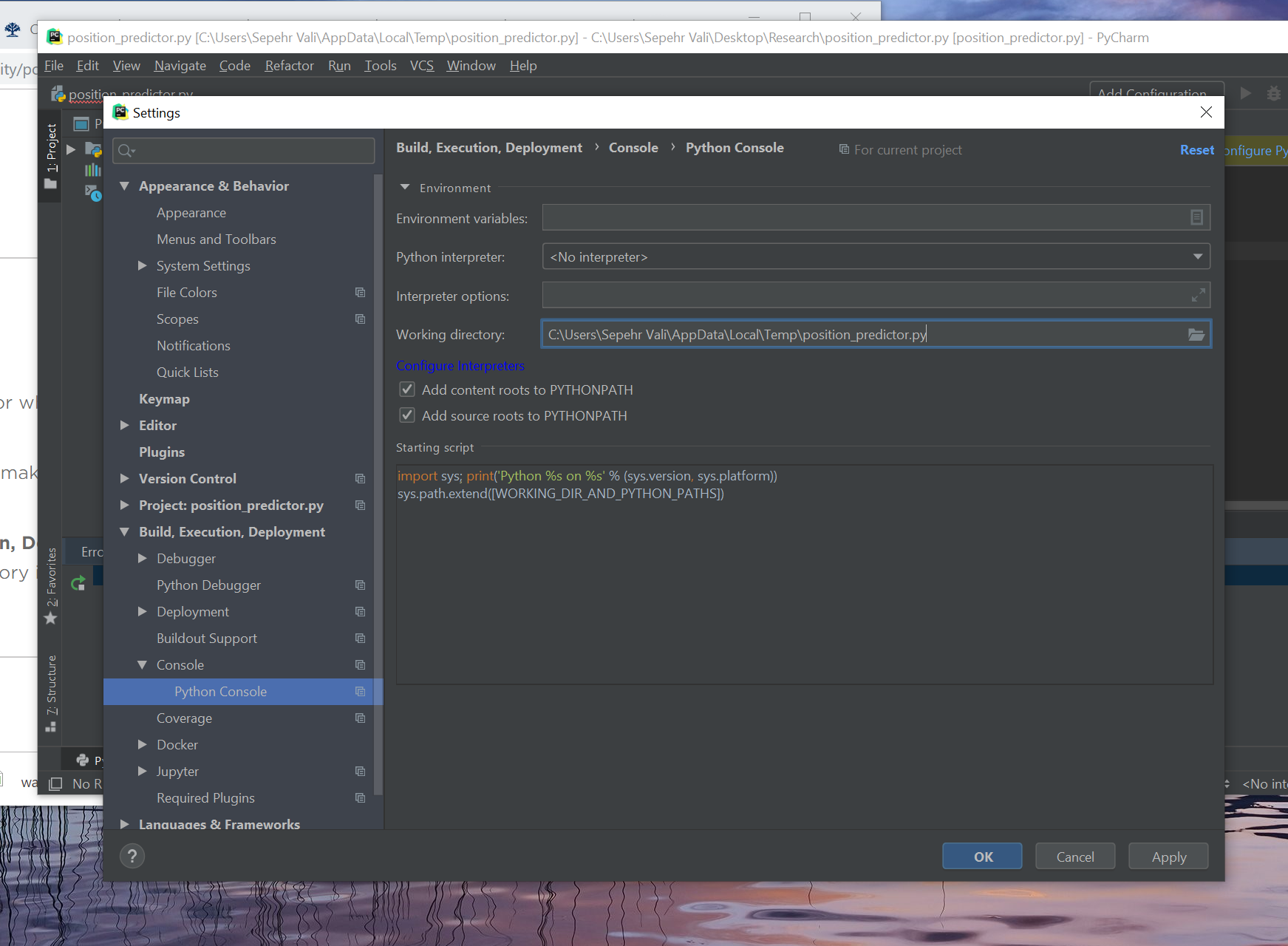
So, what is the working directory and how can I make sure that it is correct ?
Also sergey, could you please help me with this question : https://intellij-support.jetbrains.com/hc/en-us/community/posts/360003682919-Configure-Python-Interpreter-and-No-R-interpreter-defined.
Working directory expects a directory, but you are pointing it to a file. You can either leave this field empty or set it to a directory if you need it specifically for your development.
>Also sergey, could you please help me with this question : https://intellij-support.jetbrains.com/hc/en-us/community/posts/360003682919-Configure-Python-Interpreter-and-No-R-interpreter-defined.
As I can see my colleague is already working on that request.
Sergey, Can you please tell me where I need to locate my working directory if I want my console to start working ?
Just leave it empty as mentioned above, but make sure you specified Python interpreter for it.
Here is example:
 See https://www.jetbrains.com/help/pycharm-edu/console-python-console.html for more details about Python Console.
I did that exact thing and it still does not work.
Do you just open Python Console or you run a script using Python Console?
Please share a screenshot showing the issue.
Whenever I click on the python console button, this error just shows. I don't think I was ever able to run a script on it because an error just comes up automatically.
How do you close it?
You need to click on Close tab button
Looks like you just keep opening the same Python Console.
I clicked on the close tab button. Now what ?
Now you need to open a new Python Console which should take the correct working directory from settings.
If the issue remains, please start IDE with default settings by renaming/removing configuration folder https://www.jetbrains.com/help/pycharm/directories-used-by-the-ide-to-store-settings-caches-plugins-and-logs.html
I just noticed that the project you are working on doesn't look like it should. How did you create it?
Sergey,
1. When I go to File | Settings | Build, Execution, Deployment | Console | Python Console and look at my working directory, It is empty.
However, whenever I open up pycharm and click on the python console tab in the left-down corner of the page it says :
Error: Cannot start process, the working directory 'C:\Users\Sepehr Vali\Desktop\Research\code\Position_predictor.py' is not a directory
Pycharm assumes that i have given it a directory when it looks like I have not.
Now you said:
"Now you need to open a new Python Console which should take the correct working directory from settings." But how do I know what is a correct directory ? what does it mean for a directory to be correct ?
As for your second question I created the project by opening a folder insider the 'Research' folder in my desktop called 'Code' and then I create a bunch of .py files in there and started working.
As for the link you sent me https://www.jetbrains.com/help/pycharm/directories-used-by-the-ide-to-store-settings-caches-plugins-and-logs.html. It says that all files are located under this directory :
<SYSTEM DRIVE>\Users\<USER ACCOUNT NAME>\.<PRODUCT><VERSION>. Does that mean that I have to put my .py files there for just relocate the directory to this place ?
Ok, let's start from the beginning. Could you please create a new project in PyCharm and see how Python Console works there?
You can follow this tutorial https://www.jetbrains.com/help/pycharm/creating-and-running-your-first-python-project.html
If it works fine, then you can copy your project files in a new project and continue working on it.
Sergey Karpov They are not creating a project, they are directly opening a file. I have the exact same issue. https://youtrack.jetbrains.com/issue/PY-27508
I had this issue randomly on 2021.3.2 Professional, with using a project. I discovered that it was related to the flask component and google app engine sdk, which did not have the sdk path set. I edited the .idea/projectname.iml file and removed the FacetManager component (which holds google app engine) and the flask component, and the console started working again after a restart.